
CNC Router 3030: What It Is, Uses, Setup, and Key Considerations
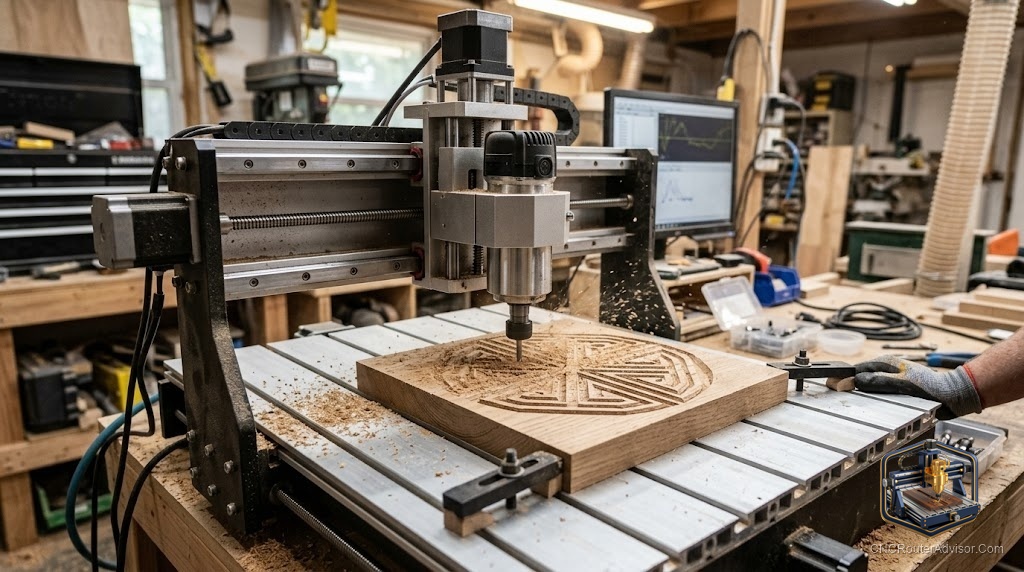
The “3030” designation on a CNC router refers to its work area: roughly 300 by 300 millimeters, about 12 by 12 inches, making it a compact desktop machine suited to small parts, engraving, and learning. At this size, a 3030 router fits on a workbench, runs on household power, and handles a wide range of beginner and intermediate projects in wood, soft plastics, and light materials. Understanding what a 3030 CNC router is capable of, how to set it up, and what considerations govern its use is useful for anyone starting with desktop CNC or working at small scale.
A 3030 router is a capable desktop machine within its scale, so understanding its work area, materials, setup, and limitations makes it a more effective tool.
A CNC router 3030 is a desktop machine with a roughly 300 by 300 mm (about 12 by 12 in) work area, designed for small parts, engraving, light carving, and learning. Its compact size suits a bench, runs on standard household power, and makes it accessible for hobbyists, educators, and small-scale makers. Setup involves assembling the machine (many ship as kits), connecting and configuring the controller (often GRBL-based), leveling the spoilboard, and learning the CAD/CAM software. Key considerations are work area (limiting project size to small parts and panels), material capability (wood, MDF, soft plastics, foam, and some light metals on a rigid machine), rigidity (more important than raw size for cut quality), and community and software support (strong on popular models). A well-chosen 3030 is a solid entry into desktop CNC and a capable small-parts machine.
A 3030 is a compact, accessible desktop machine best suited to small parts, engraving, and learning, with strong community support on popular models.
What a 3030 CNC router is
The “3030” designation refers to the work area, approximately 300 by 300 mm:
- Work area: 300 x 300 mm (about 12 x 12 in) cutting envelope, suited to small parts, plaques, signs, jewelry, and engraving.
- Desktop format: compact enough for a workbench or desk, without a dedicated floor space.
- Household power: typically runs on standard single-phase outlets without special wiring.
- Entry and intermediate level: popular for hobbyists, educators, and makers starting with CNC or doing small-scale production.
The 3030 sits between the smallest desktop engravers and larger bench machines, offering more capability than a micro engraver without the footprint of a full bench router.
What it can do
Within its work area, a 3030 handles:
- Wood: sign blanks, small carvings, plaques, boxes, and decorative parts in soft and light hardwoods.
- MDF and plywood: small panels and parts.
- Soft plastics and acrylic: with the right bits and feeds.
- Foam: patterns, molds, and props at small scale.
- Engraving: lettering, artwork, and detail work in wood, plastic, and some soft metals.
- Light non-ferrous metals: on a rigid machine with appropriate tooling and slow feeds.
The work area limits project size, but within 300 x 300 mm the machine is capable.
Setup essentials
- Assembly: many 3030 kits ship as components; follow the assembly instructions carefully for a square, rigid build.
- Controller and firmware: configure the GRBL-based controller (common on this size), set steps per mm, and confirm axis movement.
- Spoilboard: attach and surface a spoilboard for a flat, consistent reference.
- CAD/CAM software: install and configure software compatible with GRBL (many free and low-cost options are available).
- Test cuts: run calibration and test cuts on scrap before production work.
A methodical setup produces a machine that cuts accurately and consistently from the start.
Key considerations
Work area limit. The 300 x 300 mm envelope is the main constraint. Plan projects that fit within it, and accept that large panels and full-sheet work are beyond this machine.
Rigidity. At this size, a more rigid machine cuts a wider range of materials more cleanly. Weight rigidity in your choice over raw specifications.
Community and software. Popular 3030 models (many GRBL-based) have large communities, abundant tutorials, shared settings, and readily available parts, all of which make learning far easier.
Noise and dust. Even a small router produces noise and dust. Plan dust collection (a dust shoe and small vacuum) and consider an enclosure for noise and chip containment.
Upgrade path. Many 3030 machines accept a better spindle, enclosure, or other upgrades, letting you grow the machine’s capability as your projects develop.
The verdict
A CNC router 3030 is a compact desktop machine with a roughly 300 by 300 mm work area, suited to small parts, engraving, light carving, and learning. It fits on a workbench, runs on household power, and handles wood, soft plastics, foam, and some light metals with the right setup. Set it up with a surfaced spoilboard, configured GRBL controller, and compatible CAD/CAM software, then test before production. Weight rigidity in your choice, favor a model with a strong community and software support, plan dust collection and a dust shoe, and consider the upgrade path for future growth. Within its scale, a well-chosen 3030 is a capable, accessible CNC machine.
Three things to take with you:
- A 3030 CNC router has a roughly 300 x 300 mm work area, fits on a bench, runs on household power, and suits small parts, engraving, light carving, and learning.
- Set up with a surfaced spoilboard, configured GRBL controller, compatible CAD/CAM, and test cuts before production; rigidity matters more than raw size for cut quality.
- Favor a model with a strong community and software support, plan dust collection from the start, and consider the upgrade path as your projects grow.
FAQ
What does the “3030” mean on a CNC router? It refers to the work area, approximately 300 by 300 millimeters (about 12 by 12 inches). This is the cutting envelope, the maximum area the machine can cut in one setup. It makes the 3030 a compact desktop machine suited to small parts, plaques, signs, and engraving.
What can a 3030 CNC router cut? Within its 300 x 300 mm work area: soft and light hardwoods, MDF, plywood, soft plastics and acrylic, foam, and detail engraving in various materials. A rigid machine with appropriate tooling can also handle some light non-ferrous metal work. Large panels and full-sheet work are beyond this machine’s envelope.
Is a 3030 CNC router easy to set up? For many models that ship as kits, assembly and configuration take time and some patience, but the steps are well-documented and the large communities around popular GRBL-based models provide abundant tutorials. Following assembly carefully for a square, rigid build, then configuring the controller and software, produces a reliable machine.
What software works with a 3030 CNC router? Most 3030 machines use GRBL-based controllers, compatible with many free and low-cost CAD/CAM programs. Options range from beginner-friendly tools for simple 2D work to more capable programs for 3D carving. The large communities around popular models provide abundant setup guides and shared settings.
Do I need dust collection for a 3030 router? Yes. Even a small desktop router produces chips and fine dust during cutting, and dust affects both air quality and cut visibility. A dust shoe connected to a small shop vacuum is the standard setup for desktop machines, and an enclosure also helps contain noise and debris.
Can I upgrade a 3030 CNC router? Many popular models accept upgrades such as a more powerful spindle, an enclosure for noise and dust, improved workholding, or better electronics, letting you grow capability as projects develop. Choosing a model with a strong community and ecosystem of upgrades protects your initial investment.
References
- Wikipedia, CNC router overview and desktop configurations: https://en.wikipedia.org/wiki/CNC_router
- GRBL project (firmware documentation): https://github.com/grbl/grbl/wiki