
VEVOR 3018 Pro CNC Router Guide: Work Area, Machine Size, and Buying Factors
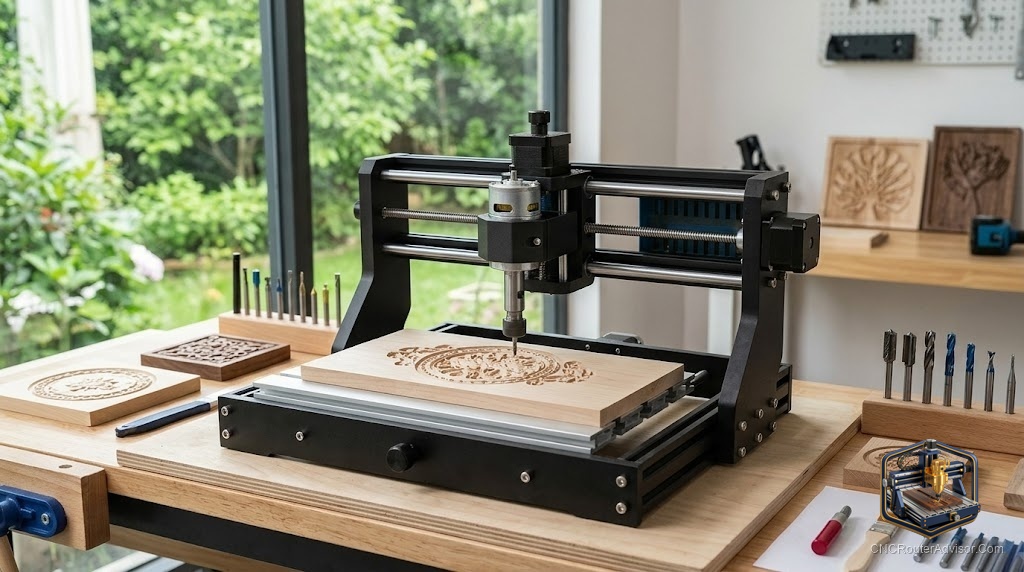
The 3018 has become the default answer to “what is the cheapest way to actually learn CNC,” and VEVOR is one of the most widely available names selling one. The VEVOR 3018 Pro sits at a price point low enough to be an impulse-adjacent purchase and capable enough to teach you the entire workflow, from design to G-code to cutting, on real hardware. It will not cut hardwood furniture parts or run a production shop, and it is not meant to. What it does is lower the barrier to entry about as far as it goes. This guide explains what the VEVOR 3018 Pro is, its work area and size, what it can and cannot do, and the factors to weigh before buying.
For a first machine, understanding the realistic capabilities matters more than any spec sheet, because the 3018 class rewards buyers who match their expectations to what a compact, budget machine can genuinely do.
The VEVOR 3018 Pro is a compact, entry-level desktop CNC router with a work area of roughly 300 by 180 by 40 to 45 mm (about 11.8 by 7.1 by 1.8 inches), an aluminum-and-composite frame, a small spindle (a 60W-class 775 DC motor turning around 10,000 RPM), GRBL control with an offline controller option, and lead-screw drive. It suits engraving and light cutting in wood, plastics, acrylic, PCB, and soft materials, and is aimed at beginners learning CNC on a budget. Buying factors include its small work area (which limits project size, though the Y axis is often expandable toward 400 mm), its modest rigidity and spindle power (fine for engraving and soft materials, limited for hardwood), and its value as a learning platform on the widely supported GRBL and 3018 ecosystem.
It is a superb way to learn CNC cheaply; it is not a machine for large parts, hardwood production, or heavy cutting.
A verified current listing is available on Amazon: VEVOR 3018 CNC Router Machine.
Work area and machine size
The headline number is the work area: approximately 300 by 180 by 40 to 45 mm. In practical terms that is room for small plaques, PCBs, jewelry, coasters, small signs, and engraving, but not for large panels or full-size project parts. Two useful notes:
- The Z clearance is small (around 40 to 45 mm), which limits workpiece thickness and tool length. Plan projects accordingly.
- The Y axis is often expandable toward 400 mm on many 3018 variants, giving a bit more length for longer, narrow work if your specific model supports it.
The machine footprint is compact, sitting comfortably on a desk or bench, which is a large part of the appeal for makers without dedicated shop space. It is light enough to move and store, at the cost of the rigidity that heavier machines gain from mass.
What it can and cannot do
It can: engrave and cut soft materials well, wood (especially softwoods), plastics, acrylic, PCB, leather, and similar. For engraving, name plates, PCB milling, small decorative work, and learning toolpaths, it is genuinely capable.
It cannot (well): cut hardwood in any serious way, remove material fast, or hold tight tolerances under load. The modest spindle power and frame rigidity mean hardwood and heavier cutting are slow, rough, or beyond it. Metal beyond very light engraving in soft alloys is not its job.
Set expectations here and the machine satisfies; expect furniture-grade hardwood work and it will disappoint. That is true of the whole 3018 class, not VEVOR specifically.
Buying factors
Treat it as a learning platform. The strongest case for a VEVOR 3018 Pro is learning the full CNC workflow, design, CAM, setup, zeroing, and cutting, on real, inexpensive hardware. Skills transfer directly to bigger machines later. As a first machine, its low cost and low stakes are the point.
Match the work area to small projects. The 300 by 180 mm area suits small work. If you already know you want large signs or panels, this is the wrong machine; a larger router serves better. If your work is small, the size is fine, and the expandable Y axis adds a little room.
Understand the rigidity and power limits. The composite-and-aluminum frame and small spindle handle engraving and soft materials but not hardwood or heavy cuts. Use shallow passes and appropriate feeds, and do not expect production speed.
Value the GRBL and 3018 ecosystem. The 3018 runs GRBL with a huge community, extensive tutorials, and abundant parts and upgrades (spindle upgrades, limit switches, better hold-downs). This support network is one of the best reasons to buy into the class, making problems easy to solve and the machine easy to improve.
Plan likely upgrades. Many owners add limit switches, a better spindle, improved workholding, or an enclosure. Factor that the base machine is a starting point you can improve as you learn.
The verdict
The VEVOR 3018 Pro is one of the least expensive ways to genuinely learn CNC, offering a compact 300 by 180 mm machine that engraves and cuts soft materials well and teaches the entire workflow on real hardware. Its limits, small work area, modest rigidity, and a small spindle, mean it is not for large parts, hardwood, or heavy production, and expecting that leads to disappointment. Match it to small projects and a learning goal, lean on the large GRBL and 3018 community, and plan to upgrade as you grow. For a first machine on a budget, it does exactly what it should.
Three things to take with you:
- The VEVOR 3018 Pro is a compact entry-level machine (around 300 by 180 by 40 to 45 mm) best understood as an inexpensive platform for learning the full CNC workflow.
- It engraves and cuts soft materials (wood, plastics, acrylic, PCB) well but is not for large parts, hardwood, or heavy production; match expectations to the 3018 class.
- Its biggest asset beyond price is the large GRBL and 3018 ecosystem of tutorials, parts, and upgrades, which makes it easy to support and improve over time.
FAQ
What is the work area of the VEVOR 3018 Pro? Approximately 300 by 180 by 40 to 45 mm (about 11.8 by 7.1 by 1.8 inches). The Z clearance is small, limiting workpiece thickness and tool length, though the Y axis is often expandable toward 400 mm on many 3018 variants.
What can the VEVOR 3018 Pro cut? It handles engraving and light cutting in soft materials: wood (especially softwoods), plastics, acrylic, PCB, and leather. It is not suited to hardwood in any serious way, fast material removal, or metal beyond very light engraving in soft alloys.
Is the VEVOR 3018 Pro good for beginners? Yes. Its low cost, small footprint, and the huge GRBL and 3018 community make it one of the best ways to learn the full CNC workflow, design, CAM, setup, and cutting, on real hardware, with skills that transfer to larger machines.
Can the VEVOR 3018 Pro cut hardwood? Not well. The modest spindle power and frame rigidity make hardwood slow, rough, or beyond the machine. It excels at engraving and soft materials; for hardwood work, a more rigid and powerful machine is the right tool.
Does the VEVOR 3018 Pro run offline? Many versions include or support an offline controller, letting you run jobs from the controller without a tethered computer. It uses GRBL control, compatible with standard senders and CAM software.
What upgrades are common on a 3018 CNC? Owners often add limit switches, a more powerful spindle, improved workholding, and an enclosure, and some expand the Y axis. The large 3018 ecosystem makes parts and upgrades easy to find, so the base machine is a starting point you can improve as you learn.
References
- VEVOR, 3018 Pro CNC router product listing (verified): Check on Amazon
- VEVOR, official CNC 3018 Pro specifications: https://www.vevor.com