
CNC Router with Automatic Tool Changer: Tool Capacity, Workflow Benefits, and Buying Factors
Watch someone run a shop full of manual tool changes for one afternoon and you will understand why the automatic tool changer exists. They are standing at the machine, waiting. The router finishes a pocketing pass, stops, and beeps for a new bit. They loosen the collet, swap the tool, touch off the new length, and hit go. Then they wait for the next stop. A nested cabinet job can ask for that dance a dozen times an hour, and every swap is a chance to grab the wrong bit or fumble the Z height.
A CNC router with an automatic tool changer takes that whole ritual and hands it to the machine. You load the tools once, and the router pulls whatever the file calls for, on its own, in a few seconds, without you in the room. For a hobbyist that is a nice convenience. For anyone cutting to make money, it is often the difference between a machine that pays for itself and one that owns your afternoons.
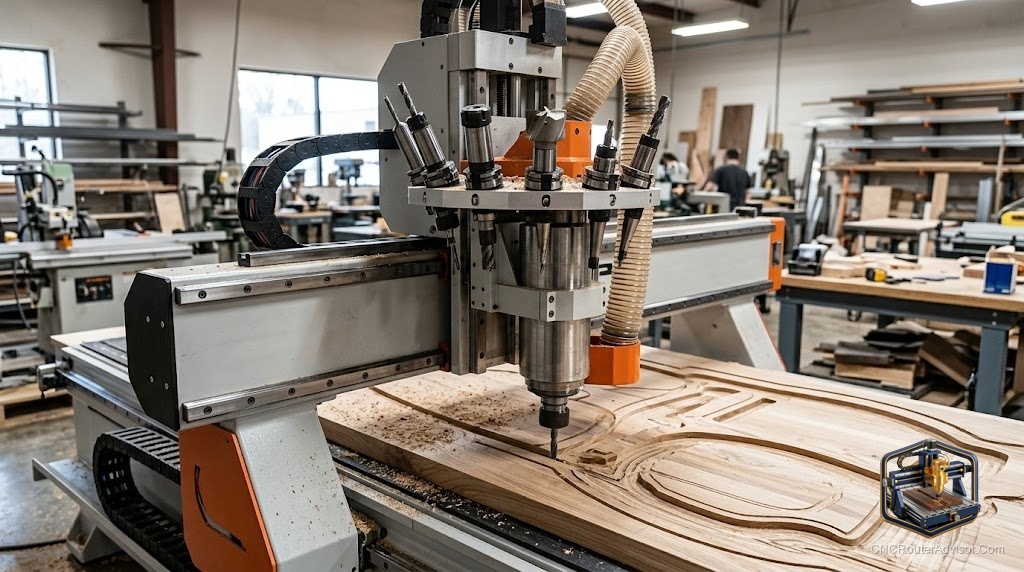
An automatic tool changer, usually shortened to ATC, is a spindle and tool magazine that swap cutting tools under program control. The CAM file issues a tool-change command, the spindle sets the current tool down in the rack, picks up the next one, reads its stored length, and keeps cutting. No hands, no re-zeroing, no pausing the job.
If you are deciding whether an ATC router belongs in your shop, the short answer is this: it earns its keep when your jobs use three or more tools and you run them often enough that stopping to swap bits is eating real hours. If most of your work runs on a single bit, the extra cost and maintenance of an ATC is money spent on a problem you do not have.
How an automatic tool changer actually works
The mechanics are simpler than they look. Once the machine is set up, a tool change follows a short, repeatable sequence. The change command comes from the program. The spindle moves to a fixed tool-change position over the rack. The Z axis drops to set the current tool into its pocket, the spindle releases it, then moves to the next tool and clamps it. The machine confirms the new tool’s length, usually against a tool-height sensor, and returns to the cut. Start to finish, that is a matter of seconds, and it repeats as many times as the file asks without anyone standing there.
That tool-height step is the quiet magic. Because the machine measures each tool, you are not eyeballing Z heights or trusting your memory between swaps, which is exactly where manual changes go wrong.
Tool capacity: how many pockets you really need
The number that sells machines is magazine size, and it is easy to overbuy. Tool capacity on router ATCs ranges from a handful of pockets to a couple dozen, depending on the magazine style. More is not automatically better, because every pocket you buy is cost and complexity you maintain.
For cabinet and general sheet-goods work, most shops land comfortably in the six to twelve tool range. That covers the usual working set: a couple of compression bits for clean sheet cuts, a through-cutting bit, a dado or straight bit, a drill or two for shelf pins and hinges, a V-bit for engraving, and a spare or two so you are not reloading mid-run. Push past twelve only if you genuinely run varied jobs back to back and hate reloading the magazine between them.
Be honest about your actual working set before you pay for pockets. A shop that runs the same four tools all day is better served by a rock-solid eight-position machine than a finicky twenty-four-position one.
Linear vs carousel magazines
Two styles dominate. A linear (or in-line) rack sits along the edge of the table, tools lined up in a row, and the spindle reaches over to swap. It is simple, easy to see, and easy to reload, but it eats a strip of your work area. A carousel or rotary magazine mounts to the gantry or off to the side and rotates the needed tool into position, which keeps the table clear and speeds up changes, at the cost of a more involved mechanism to maintain. Neither is wrong. Reach-over racks suit smaller shops that value simplicity; gantry-mounted carousels suit high-cycle production where seconds add up.
The workflow benefits, and the honest tradeoffs
The upside is real and easy to feel on day one. Multi-tool jobs run start to finish untended, so one operator can run the router while doing something useful elsewhere. You stop introducing hand errors on every swap. Repeatability climbs because the machine, not your patience, sets each tool length. On production runs, the labor you claw back usually dwarfs the price gap over a manual machine.
The tradeoffs deserve equal airtime. An ATC costs more up front and adds mechanical and pneumatic parts that a manual machine simply does not have, so there is more to keep clean and adjust. Most systems depend on shop air, which means a compressor and dry, clean air become non-negotiable, and a moisture problem in your air lines becomes a tool-change problem. Tool holders for ATC spindles cost more than bare collets, and you need one per tool you keep loaded, so a full magazine is its own investment. And a single-spindle ATC still changes tools one at a time, so for pure standardized production some shops prefer a multi-spindle machine that never stops to swap at all.
ATC vs manual vs multi-spindle: pick by your bottleneck
Ignore the brochure and look at what actually slows your day. If you rarely change tools, a manual machine is more machine for the money and less to maintain. If your jobs are varied and tool-heavy, a single-spindle ATC is the sweet spot, since it handles any tool count the file throws at it with no operator standing by. If you run huge volumes of the same few operations, a multi-spindle setup can beat an ATC on raw throughput because dedicated heads never pause to swap, though you trade away flexibility to get that speed.
What to check before you buy
- Spindle and holder standard. Confirm the tool-holder type (an ISO or BT taper on bigger machines, ER-style on smaller ones) and price a full set of holders into your budget, not just the machine.
- Air supply demands. Find the required air pressure and volume, then make sure your compressor and air drying can meet it all day, not just in short bursts.
- Tool-height sensing. Verify the machine measures tool length automatically. Without reliable sensing, an ATC loses half its value.
- Magazine placement. Decide whether a table-edge rack stealing work area is fine, or whether you need a gantry-mounted magazine to keep the full table.
- CAM and post support. Your CAM software has to output proper tool-change commands for this controller. Confirm the post processor exists and works before you commit.
- Serviceability. Ask what the common wear items are, how tool-change faults are cleared, and how easy the magazine is to reload and align.
The verdict
An automatic tool changer is one of the few upgrades that changes how a shop feels to run, not just what it can cut. If your work is multi-tool and repetitive, buy the ATC, size the magazine to your real working set rather than the biggest number offered, and spend as much attention on your air supply as on the machine itself, because dirty air is what turns a great ATC into a frustrating one.
Three things to hold onto:
- Count the tools your typical job actually uses, then buy a magazine a little larger, not a lot larger.
- Treat clean, dry shop air as part of the purchase, since most ATCs live or die by it.
- Skip the ATC entirely if you run mostly single-tool work; you would be paying to maintain a solution to a problem you do not have.
FAQ
What does ATC mean on a CNC router? ATC stands for automatic tool changer. It is a spindle and tool magazine that swap cutting tools under program control, so the machine pulls each bit a job needs without an operator stopping to do it by hand.
How many tools should an ATC CNC router hold? For cabinet and sheet-goods work, six to twelve positions cover most shops. Choose more only if you run varied jobs back to back and want to avoid reloading the magazine between them.
Is an ATC CNC router worth it for a hobbyist? Usually not. The extra cost, the air-supply requirement, and the added maintenance make sense when tool changes are eating production hours. For occasional single-tool projects, a manual machine is simpler and cheaper.
Do ATC routers need an air compressor? Most do. The tool-change mechanism is typically pneumatic, so a compressor delivering clean, dry air at the machine’s rated pressure and volume is part of the setup, not an optional extra.
How long does an automatic tool change take? On a router ATC a single change generally takes a matter of seconds, including the automatic tool-length check, which is far faster and more repeatable than a careful manual swap.
What is the difference between an ATC and a multi-spindle router? An ATC uses one spindle that swaps among many tools, so it handles any tool count with full flexibility. A multi-spindle machine has several dedicated heads that never pause to swap, which is faster for high-volume standardized work but less flexible.
Do I need special software for an ATC? You use standard CAM software, but it must output tool-change commands through a post processor built for your controller. Confirm that post exists and runs correctly before buying.
References
- ShopSabre CNC, “Benefits of an Automatic Tool Changer and How It Works”: https://www.shopsabre.com/benefits-of-an-automatic-tool-changer-and-how-it-works/
- BCAMCNC, “Choosing the Right ATC Tool Capacity for Efficient Cabinet CNC Production”: https://www.bcamcnc.com/choosing-the-right-atc-tool-capacity-for-efficient-cabinet-cnc-production/
- AccTek CNC, “How Does an ATC CNC Router Work?”: https://acctekcnc.com/how-does-an-atc-cnc-router-work/