
CNC Router Table Top (Benchtop) Explained: Capabilities, Limits, and How to Choose
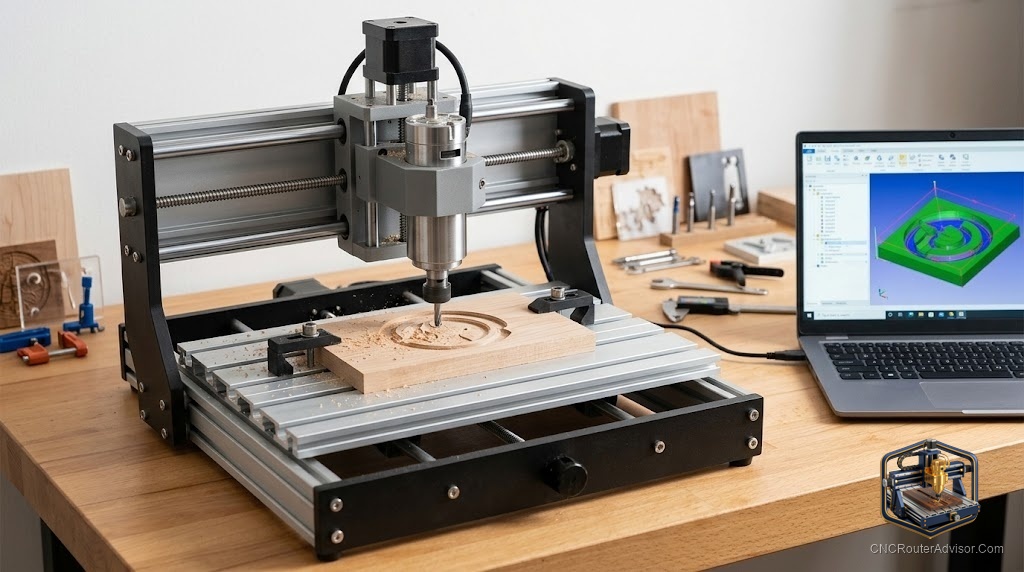
A tabletop, or benchtop, CNC router is where most people begin their CNC journey, and for good reason: it sits on a bench, costs a fraction of a full-size machine, and can still do genuinely useful work. But “tabletop” spans a wide range, from tiny 3018-class machines to capable benchtop routers that rival entry professional machines, and understanding what a tabletop CNC can and cannot do helps you choose one that fits your projects and your space without overpaying or outgrowing it immediately. This guide explains tabletop CNC routers, their capabilities, limits, and how to choose.
A tabletop (benchtop) CNC router is a compact CNC router designed to sit on a workbench or table, ranging from small desktop machines (3018-class) to larger, more capable benchtop routers. Tabletop machines trade work area and outright rigidity for affordability, small footprint, and accessibility, making them ideal for hobbyists, small businesses, education, and anyone with limited space.
The short answer on tabletop CNC: it’s the ideal starting point and a genuinely capable tool for signs, engraving, small parts, art, and light-duty work in wood, plastics, and soft metals, provided you match the machine to your work. Choose based on the work area you need, the rigidity your materials demand, and the software and support that fit your experience.
What tabletop CNC routers can do
- Sign making and engraving: V-carved signs, lettering, and decorative engraving, a top use.
- Small parts and prototypes: brackets, enclosures, model parts, and prototypes.
- Art and decor: wall art, ornaments, coasters, inlays, and personalized gifts.
- Light aluminum and soft metals: with the right setup, feeds, and speeds, capable benchtop machines cut light aluminum, brass, and copper.
- PCBs and fine work: small machines handle PCB milling and delicate engraving.
- Learning CNC: the accessible, affordable way to learn the full CAD-CAM-cut workflow.
The limits of tabletop machines
- Work area: smaller than full-size machines, larger projects need tiling/multiple setups or a bigger machine.
- Rigidity: less than full-size steel machines; heavy cutting and hard metals are limited (though benchtop rigidity has improved with ball screws and linear rails).
- Spindle power: typically trim routers or smaller spindles; not for heavy production.
- Duty cycle: built for hobby/light-business use, not continuous production.
The tabletop range: desktop vs. capable benchtop
Small desktop (3018-class, e.g., Genmitsu 3018-PROVer, MYSWEETY 4540, TwoTrees TTC450 Pro). Roughly $200 to $800. Tiny footprint, great for learning, engraving, PCBs, and small soft-material parts. Limited work area and rigidity.
Capable benchtop (e.g., Shapeoko, Onefinity, Sienci, FoxAlien Vasto, Next Wave). Roughly $1,500 to $6,000. The benchtop sweet spot, real rigidity (ball screws, linear rails, closed-loop steppers on some), larger work areas, and the ability to do serious signs, furniture parts, art, and light aluminum. Bridges hobby and professional work.
Software for tabletop CNC
- Beginner-friendly: Carbide Create (free), Easel (X-Carve), and similar lower the barrier.
- Capable/advanced: VCarve Desktop or Pro (roughly $350 to $700) for serious sign and 2.5D work; Fusion 360 (about $500/year, with free tiers for some users) for 3D and CAD/CAM.
- Learning curve: simple 2D work in about a week, V-carving in a couple of weeks, and 3D in about a month with structured learning.
How to choose a tabletop CNC router
- Define your projects: materials, part sizes, and detail level.
- Choose the tier: small desktop for learning and tiny parts; capable benchtop for serious hobby and small-business work.
- Size the work area to your typical (and slightly larger) projects, plus your available bench space and footprint.
- Weigh rigidity for your materials (ball screws and linear rails for aluminum and clean cuts).
- Pick the spindle (trim router for light work; VFD spindle option for more).
- Match software and support to your experience, strong documentation and community help beginners.
- Budget the full system: machine, bits, dust collection, and workholding.
The verdict
A tabletop (benchtop) CNC router is the ideal entry point and, in its capable benchtop form, a genuinely serious tool. It trades work area and outright rigidity for affordability, a small footprint, and accessibility, making it perfect for signs, engraving, small parts, art, light aluminum, and learning. The key is matching the machine to your work: small desktop machines (3018-class, $200 to $800) for learning and tiny parts, and capable benchtop routers ($1,500 to $6,000) for serious hobby and small-business work. Size the work area to your projects and space, weigh rigidity for your materials, choose software and support that fit your experience, and budget for the full system. Do that, and a tabletop CNC delivers remarkable capability from a corner of your bench.
Three takeaways: tabletop/benchtop CNC routers trade work area and rigidity for affordability, small footprint, and accessibility, ideal for signs, engraving, small parts, art, light aluminum, and learning; the range spans small desktop machines ($200 to $800) and capable benchtop routers ($1,500 to $6,000, the sweet spot); and choose by matching work area, rigidity, spindle, and software to your projects and space, budgeting for the full system.
FAQ
What is a tabletop CNC router? A compact CNC router designed to sit on a workbench, ranging from small desktop machines (3018-class) to larger, capable benchtop routers. It trades work area and rigidity for affordability, small footprint, and accessibility.
What can a tabletop CNC router do? Sign making and engraving, small parts and prototypes, art and decor, PCB milling, and, on capable benchtop machines, light aluminum and soft metals. It’s also the ideal, affordable way to learn the full CNC workflow.
What are the limits of a tabletop CNC router? Smaller work area (larger projects need tiling or a bigger machine), less rigidity than full-size steel machines, smaller spindles, and a hobby/light-business duty cycle rather than continuous production. Benchtop rigidity has improved, but heavy metal work remains limited.
Can a tabletop CNC router cut aluminum? Capable benchtop machines (with ball screws, linear rails, and a suitable spindle) can cut light aluminum, brass, and copper with the right bits, feeds, and speeds. Small desktop machines are more limited and better suited to soft materials.
How much does a tabletop CNC router cost? Small desktop machines run roughly $200 to $800; capable benchtop routers roughly $1,500 to $6,000. Budget also for bits, dust collection, workholding, and software as part of the full system.
Which tabletop CNC router is best for beginners? For learning on a budget, a 3018-class machine (Genmitsu, TwoTrees TTC450 Pro). For a serious start with room to grow, a capable benchtop (Shapeoko, Onefinity, Sienci, FoxAlien Vasto) with strong support and community. Match to your projects and budget.
What software do tabletop CNC routers use?
Beginner-friendly options like Carbide Create (free) and Easel, and more capable tools like VCarve Desktop/Pro ($350 to $700) and Fusion 360 ($500/year, with free tiers for some). Expect about a week for 2D, a couple weeks for V-carving, a month for 3D.
References
- 3DWithUs, Best Budget and Desktop CNC Machines: https://3dwithus.com/best-budget-cnc-machines
- Simply Technologies, Benchtop CNC Router Buyer’s Guide and Uses: https://simplytechnologies.xyz/benchtop-cnc-router-buyers-guide-uses-and-how-simply-technologies-fits-in/
- Genmitsu / SainSmart, 3018 and Desktop CNC Routers: https://www.sainsmart.com/collections/cnc-router-machine-kits
- 731 Woodworks, Best Benchtop CNC Machines: https://www.731woodworks.com/731-blog/best-cnc-machines-for-small-woodworking-shops-in-2025-beginner-to-pro-picks
- Carbide 3D, Shapeoko Benchtop CNC and Software: https://carbide3d.com/