
CNC Router Systems Explained: Components, Types, and How to Choose a Complete Setup
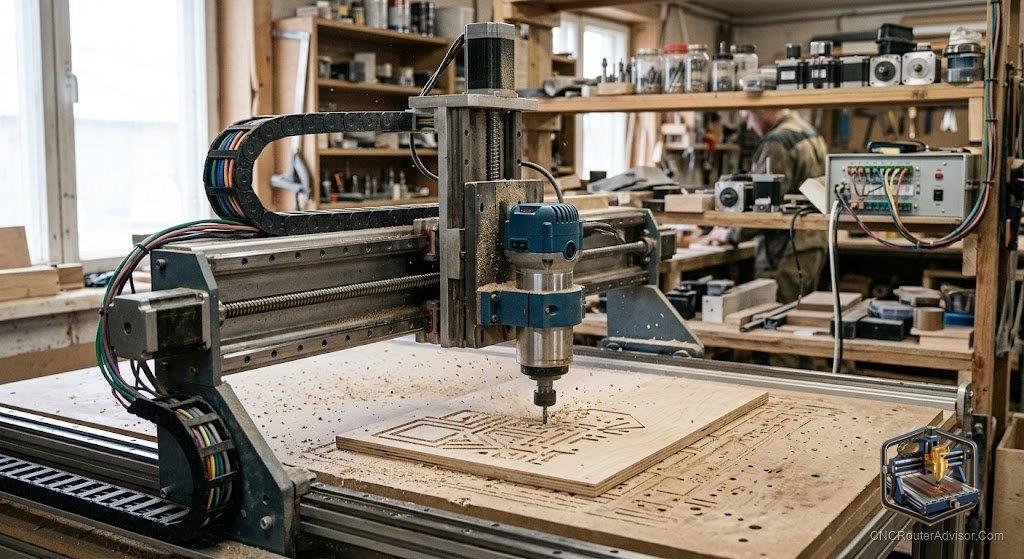
It is tempting to think of a CNC router as a single machine, but in practice it is a system, a set of components working together: the mechanical frame and motion, the spindle, the controller and electronics, the software chain, and the supporting equipment like dust collection and workholding. Buying or building a CNC router successfully means thinking in terms of the whole system, not just the machine, because a weak link anywhere, an underpowered spindle, poor dust collection, clumsy software, undermines the rest. This guide explains CNC router systems, their components, types, and how to choose a complete setup.
A CNC router system is the complete set of components that make a CNC router functional: the mechanical structure and motion system, the spindle/cutting system, the controller and electronics, the software chain (CAD, CAM, control), and supporting equipment (dust collection, workholding, and sometimes an enclosure). Choosing well means balancing all parts of the system to your work, not optimizing one in isolation.
The short answer on CNC systems: think holistically, match the mechanical system (rigidity, work area) to your materials and part sizes, pair it with an appropriate spindle and controller, choose a software chain you’re comfortable with, and budget for dust collection and workholding as part of the system. A balanced system outperforms one with a single strong component and weak links elsewhere.
The components of a CNC router system
1. Mechanical / motion system. The frame, gantry, rails, and drive (belts, ball screws, or rack and pinion) plus motors. This determines rigidity, accuracy, work area, and speed, the foundation everything else builds on. Steel or heavy aluminum frames, linear rails, and ball screws mean more rigidity and precision.
2. Spindle / cutting system. The spindle (trim router or VFD spindle, air- or water-cooled) and tooling. This sets what materials you can cut, how cleanly and quickly, and how quietly. It must match the mechanical system’s rigidity.
3. Controller and electronics. The control board (GRBL-based or industrial), stepper/servo drivers, and wiring. This translates the program into precise motion and spindle control, and determines features like closed-loop feedback and laser output.
4. Software chain. CAD (design), CAM (toolpaths and G-code), and control/sender software. The system is only as usable as its software, ease and capability here shape the whole experience.
5. Supporting equipment. Dust collection (dust shoe plus vacuum/collector), workholding (clamps, T-track, vacuum table), and sometimes an enclosure (for noise, dust, or laser safety). These are part of a working system, not optional afterthoughts.
Types of CNC router systems
- Desktop systems: compact, integrated, entry-level, for learning and small work.
- Benchtop/prosumer systems: capable mid-size systems (Shapeoko, Onefinity, FoxAlien Vasto) balancing capability and cost.
- Full-size/professional systems: 4x8 and larger with strong spindles, dust collection, and workholding for production.
- Industrial systems: heavy production systems with ATC, vacuum tables, servo drives, and integrated dust extraction.
- Kit vs. complete vs. DIY: buy a complete system, assemble a kit, or build DIY from components (more control and effort).
How to choose a complete system
- Start from your work: materials, part sizes, precision, and volume define the system you need.
- Size the mechanical system: work area for your largest parts; rigidity and drive for your materials.
- Match the spindle to materials and to the frame’s rigidity.
- Choose the controller for the features you need (closed-loop, laser output, expandability).
- Pick the software chain you’re comfortable with (beginner-friendly vs. advanced).
- Budget the supporting equipment: dust collection and workholding are essential parts of the system.
- Balance the system: avoid one strong component with weak links, spend where it removes the biggest limitation for your work.
- Account for total cost of ownership: the complete system, not just the machine’s base price.
The verdict
A CNC router is best understood and bought as a system, mechanical/motion, spindle, controller, software, and supporting equipment, all working together. The winning approach is holistic: start from your materials, part sizes, precision, and volume, then size and match each component so none is a weak link. A rigid frame paired with an underpowered spindle, or a capable machine with poor dust collection or clumsy software, disappoints; a balanced system delivers. Budget for the whole system, including dust collection and workholding, compare complete systems, kits, and DIY builds by how much effort you want, and spend where it removes the biggest limitation for your work.
Three takeaways: think in systems, mechanical/motion, spindle, controller, software, and supporting equipment (dust collection, workholding), not just the machine; start from your work (materials, sizes, precision, volume) and match every component so there’s no weak link; and budget for the complete system and its total cost of ownership, spending where it removes your biggest limitation.
FAQ
What is a CNC router system? The complete set of components that make a CNC router functional: the mechanical/motion system, spindle/cutting system, controller and electronics, software chain (CAD, CAM, control), and supporting equipment like dust collection and workholding, all working together.
Why think of a CNC router as a system? Because a weak link anywhere, an underpowered spindle, poor dust collection, clumsy software, undermines the rest. Buying successfully means balancing all components to your work rather than optimizing one in isolation.
What are the main components of a CNC system? The mechanical/motion system (frame, rails, drive, motors), the spindle and tooling, the controller and electronics, the software chain (CAD/CAM/control), and supporting equipment (dust collection, workholding, and sometimes an enclosure).
How do I choose a complete CNC router setup? Start from your materials, part sizes, precision, and volume; size the mechanical system and match the spindle to it; choose the controller and software you need; and budget for dust collection and workholding. Balance the system and account for total cost.
What supporting equipment does a CNC system need? Dust collection (a dust shoe with a shop vac or dust collector), workholding (clamps, T-track, or a vacuum table), and sometimes an enclosure for noise, dust, or laser safety. These are essential parts of a working system, not optional extras.
Should I buy a complete system, a kit, or build DIY? A complete system is easiest; a kit balances cost and involvement; a DIY build from components offers the most control but the most effort and expertise. Choose based on how much time, skill, and customization you want.
What is total cost of ownership for a CNC system? Beyond the machine: the spindle (if separate), dust collection, workholding, tooling, software, and any enclosure, plus consumables and eventual spares. Budget for the whole system, since these add meaningfully to the base price.
References
- CNCRouterInfo, CNC Router Components and Systems: https://cncrouterinfo.com/guides/how-to-choose-a-cnc-router/
- Carbide 3D, Shapeoko System (machine, software, accessories): https://carbide3d.com/
- Onefinity CNC, Machine and System Components: https://www.onefinitycnc.com/
- Avid CNC, Complete CNC Router Systems: https://www.avidcnc.com/
- Sienci Labs, Machines, Software, and Accessories: https://sienci.com/