
CNC Router Computer: Requirements, Setup, and What You Actually Need
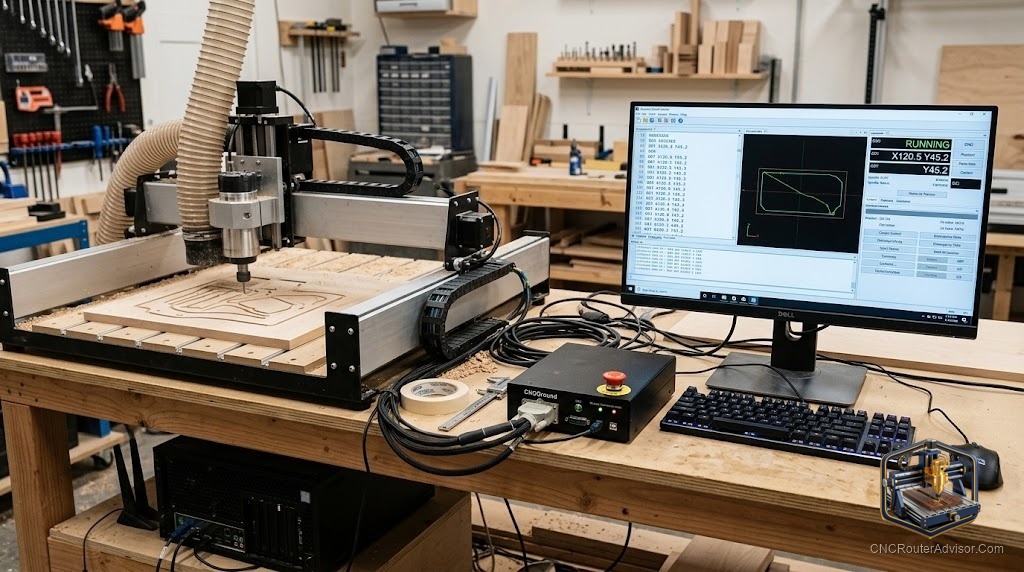
One of the most common questions from new CNC router owners is deceptively simple: what computer do I need to run this thing? The confusion is understandable, because the answer depends entirely on your machine’s controller and how it connects, and the requirements range from “almost any modern laptop” to “a dedicated older PC with a specific port.” Getting this right before you buy a machine (or a computer) saves you from the frustrating discovery that your brand-new laptop cannot talk to your CNC, or that a great-deal used machine needs hardware you no longer own.
A CNC router computer is the computer used to run CAM software (generating toolpaths) and control/sender software (streaming G-code to the machine’s controller). The requirements depend on the machine’s control system: modern GRBL and USB-based machines run on almost any current computer, while older parallel-port machines (many Mach3 imports) need a PC with a physical DB25 parallel port.
The short answer on what you need: for most modern hobby and prosumer machines (GRBL/USB), any reasonably current Windows, Mac, or even a Raspberry Pi can run the sender software; design and CAM software have modestly higher requirements. For older parallel-port Mach3 machines, you need a dedicated PC with a real parallel port, or a USB/Ethernet motion controller to bridge the gap.
Two separate jobs the computer does
It helps to separate the two roles, because their requirements differ:
1. Design and CAM (toolpath generation). Running CAD/CAM software (Fusion 360, VCarve, Carbide Create) to design parts and generate G-code. This is the more demanding job, especially 3D CAM, and benefits from a decent processor, adequate RAM, and a real graphics capability. You can do this on your main computer.
2. Machine control (sending G-code). Running the sender software that streams G-code to the controller in real time (Candle, UGS, CNCjs, Carbide Motion, Mach3). This is lightweight for GRBL/USB machines but has strict requirements for parallel-port machines. Many people use a separate, modest computer for this, kept near the machine.
You can use one computer for both, but shops often use a capable machine for design and a cheap dedicated computer at the CNC for control.
Requirements by machine type
Modern GRBL / USB machines (most hobby and prosumer routers):
- Almost any current Windows, macOS, or Linux computer works for the sender.
- Sender software (UGS, CNCjs, Candle, Carbide Motion) is lightweight.
- CNCjs can even run on a Raspberry Pi, a popular cheap dedicated controller.
- Connection is via USB (or network on some controllers).
Mach3 parallel-port machines (many older Chinese imports, some 6040/6090 machines):
- Requires Windows (Mach3 runs on Windows, typically Win7-era for parallel-port timing).
- Requires a physical DB25 parallel port on the motherboard, USB-to-parallel adapters do not work for Mach3 motion timing.
- Modern PCs lack parallel ports, so you need an older desktop, or
- A USB or Ethernet motion controller (e.g., a Mach3 USB motion card, or a UC100) to bridge a modern PC to the machine.
Industrial machines (MultiCam, Biesse, etc.):
- Usually include a dedicated onboard controller/PC with the manufacturer’s software (e.g., EZ Control). You design on a separate CAM workstation and transfer G-code by network or USB.
Practical setup recommendations
- Separate the roles if you can: design on your capable main computer; use a cheap dedicated computer or Raspberry Pi at the machine for control. This keeps the shop computer expendable in a dusty, vibration-prone environment.
- Protect the shop computer: dust and vibration are hard on electronics. A basic, replaceable machine is wise near the router.
- Confirm connectivity before buying a used machine: verify the control type (GRBL/USB vs. parallel-port Mach3) and whether you have (or can add) the required port or motion controller.
- Check software OS compatibility: Carbide Motion (Mac/Windows), UGS (cross-platform, Java), CNCjs (cross-platform, runs on Pi), Mach3 (Windows).
- Stable power and USB: use a good USB cable and avoid power-saving USB settings that can interrupt a job; a UPS protects long jobs from power blips.
The verdict
The computer you need for a CNC router depends almost entirely on the machine’s controller. Modern GRBL/USB machines, which is most hobby and prosumer routers today, run on almost any current computer, and a cheap dedicated machine or Raspberry Pi makes an ideal expendable shop controller. Older parallel-port Mach3 machines are the exception, requiring a PC with a real parallel port or a USB/Ethernet motion controller. Design and CAM software are the more demanding job and can live on your main computer. Confirm the control type before buying a machine so you are not caught without the right hardware.
Three takeaways: separate the two jobs, capable computer for design/CAM, modest expendable computer for machine control; modern GRBL/USB machines run on almost anything (even a Raspberry Pi via CNCjs); and older Mach3 parallel-port machines need a real DB25 port or a USB/Ethernet motion controller.
FAQ
What computer do I need to run a CNC router? It depends on the controller. Modern GRBL/USB machines run on almost any current computer with lightweight sender software. Older parallel-port Mach3 machines need a PC with a real DB25 parallel port or a USB/Ethernet motion controller.
Can I use a laptop to run my CNC router? Yes, for modern GRBL/USB machines, any reasonably current laptop works for both CAM and control. For parallel-port Mach3 machines, a laptop needs a USB/Ethernet motion controller since laptops lack parallel ports.
Do I need a powerful computer for a CNC router? Not for machine control, senders are lightweight. Design and CAM software (especially 3D CAM like Fusion 360) benefit from a more capable computer, which can be your main machine rather than the shop controller.
Can I run a CNC router with a Raspberry Pi? Yes, for GRBL/USB machines, CNCjs runs on a Raspberry Pi, making it a popular cheap, dedicated controller kept at the machine. It handles G-code streaming, not heavy CAM work.
Why do some CNC routers need a parallel port? Many older Chinese imports run Mach3, which uses the parallel port’s precise timing to drive the motors directly. Modern PCs lack this port, and USB adapters do not provide the needed timing, so a real port or a motion controller is required.
Should I use one computer or two for my CNC? Either works, but many shops use a capable computer for design/CAM and a cheap, expendable computer (or Pi) at the machine for control, since the shop environment is dusty and vibration-prone.
What operating system does CNC software need? It varies: Carbide Motion runs on Mac and Windows, UGS and CNCjs are cross-platform (CNCjs runs on a Pi), and Mach3 runs on Windows. Confirm your sender’s OS support before setting up.
References
- CNCRouterInfo, How to Choose a CNC Router (controllers and connectivity): https://cncrouterinfo.com/guides/how-to-choose-a-cnc-router/
- CNCjs, Documentation (runs on Windows, macOS, Linux, Raspberry Pi): https://cnc.js.org/
- Universal Gcode Sender (UGS), About (cross-platform G-code sender): https://winder.github.io/ugs_website/
- Carbide 3D, Carbide Motion (Mac/Windows control software): https://carbide3d.com/carbidemotion/
- Newfangled Solutions, Mach3 CNC Control Software (Windows, parallel port): https://www.machsupport.com/software/mach3/