
CNC Router 5 Axis: What the Extra Axes Actually Add and When They Are Worth It
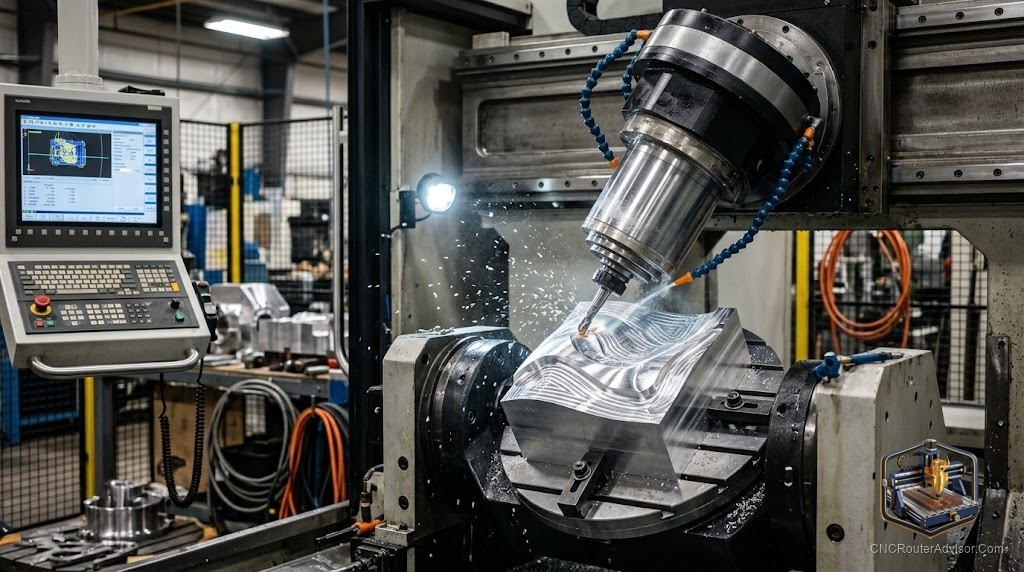
A 5-axis CNC router is one of those machines that generates more questions than answers in most hobbyist conversations, because the capability it adds is genuinely impressive but rarely needed at the hobby or small-shop level. Understanding what the two extra axes actually do, where that capability matters, and why most wood and sign work does not require them is what makes the 5-axis conversation useful rather than just aspirational.
A 5-axis CNC router is a CNC router with five programmable axes of motion: the standard three linear axes (X, Y, Z) plus two rotational axes (commonly A and B or A and C). The additional rotational axes allow the cutting tool to approach the workpiece from multiple angles in a single setup, enabling compound angles, undercuts, and complex 3D shapes that would require multiple setups or different fixtures on a 3-axis machine.
Here is the direct framing: 5-axis routing is genuinely valuable for aerospace, automotive, mold-making, and complex 3D sculpting where compound angles and undercuts are necessary, and it is largely overkill for most wood work, sign work, and furniture where 3-axis and a rotary axis (3.5 or 4-axis) cover what is needed. The sections below explain what the axes add, where they matter, and the honest cost and complexity picture.
What the two extra axes do
The standard three linear axes move the tool in X, Y, and Z, which allows cutting any shape whose features are accessible from above. The two rotational axes tilt and rotate the tool, which allows it to approach from the side, cut undercuts, machine compound-angle surfaces without repositioning the part, and work on multiple faces of a 3D object in one setup. This eliminates repositioning errors that accumulate between setups and enables shapes that are geometrically impossible to reach with a vertical tool.
Where 5-axis is genuinely necessary
The industries that rely on 5-axis machining are those where compound angles and undercuts are intrinsic to the part: aerospace structural components with complex flanges, automotive body molds, marine propellers and impellers, turbine blades, and complex artistic sculptures. For these parts, 5-axis machining is not a luxury but a manufacturing requirement.
Where 3-axis (or 4-axis) is sufficient
Most wood work, sign work, and furniture production is 3-axis work with occasional 4-axis rotary passes for cylindrical parts like chair legs, balusters, and turned carvings. Signs, cabinet doors, furniture carvings, and reliefs are all accessible from above and do not require tool tilting. A 4th-axis rotary module on a 3-axis machine covers the cylindrical use case at a fraction of the cost of a 5-axis machine.
The cost and complexity reality
A 5-axis CNC router is significantly more expensive, more complex to program (requiring 5-axis CAM software, which is expensive and has a steep learning curve), and more complex to maintain than a 3-axis machine. The CAM software alone for true 5-axis machining represents a major investment and skill commitment. For most hobbyists and small shops, the cost-to-benefit ratio of 5-axis does not close until the work genuinely requires compound angles and undercuts.
For 4th-axis rotary work, which covers most cylindrical and wrapped-design needs that 3-axis cannot handle, our guide to the 4th axis CNC router is the more practical starting point.
Final verdict
A 5-axis CNC router adds genuine capability for compound angles, undercuts, and complex 3D shapes in a single setup, and it is the right machine for aerospace, automotive, mold, and complex sculpture work where those capabilities are intrinsic to the parts. For wood, signs, furniture, and most small-shop work, 3-axis with an optional 4th rotary axis covers the work at a fraction of the cost and complexity. Buy 5-axis when the work demands it; buy 3-axis with a rotary module when it does not.
FAQ
What is a 5-axis CNC router? A CNC router with five programmable axes: the standard three linear axes (X, Y, Z) plus two rotational axes that allow the tool to approach the workpiece from multiple angles in a single setup.
What can a 5-axis router do that a 3-axis cannot? Cut compound angles, undercuts, and multi-face features in a single setup without repositioning. This eliminates setup errors and enables shapes geometrically inaccessible from directly above.
Do I need a 5-axis router for woodworking? Almost certainly no. Wood work, signs, furniture, and carvings are typically 3-axis work. A 4th-axis rotary module covers cylindrical and wrapped-design needs without 5-axis cost and complexity.
What industries use 5-axis machining? Aerospace, automotive, marine, mold-making, and complex artistic sculpture, where compound angles and undercuts are intrinsic to the part geometry.
How much more expensive is 5-axis CNC? Significantly more: the machine, the 5-axis CAM software, and the programming skill all represent major additional investments over a 3-axis machine with a rotary module.
What is the difference between 4-axis and 5-axis CNC routing? A 4th axis adds one rotational axis, typically for cylindrical parts and wrapped designs. A 5th axis adds a second rotational axis, enabling compound angles and undercuts, which most wood and sign work does not require.
References
- Carbide 3D, axis and machine type reference: https://carbide3d.com
- Autodesk, 5-axis machining overview: https://www.autodesk.com
- Avid CNC, multi-axis machine configurations: https://www.avidcnc.com