
Build CNC Router: Choosing Every Component and Why Each Decision Matters
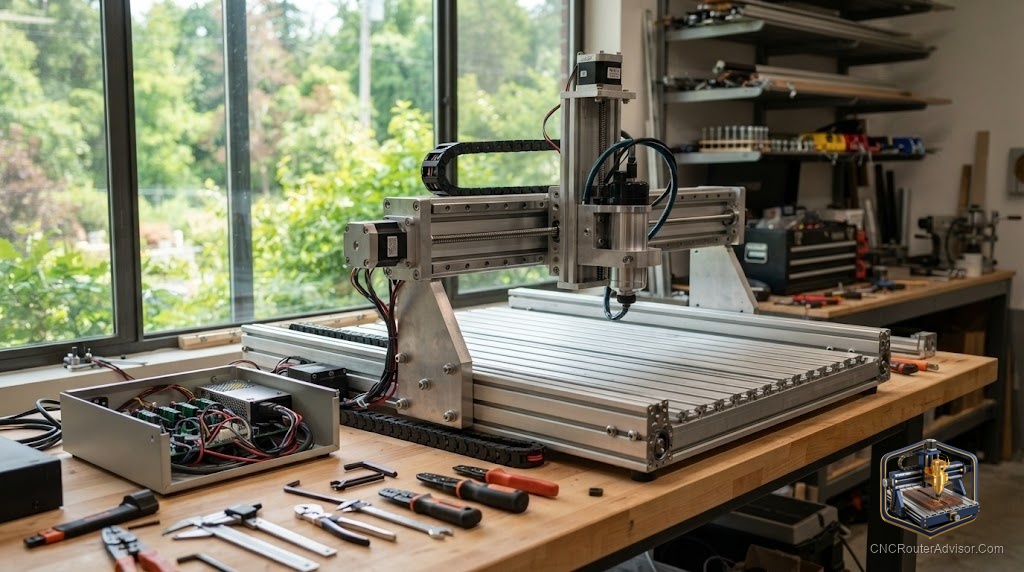
Once you have decided to build rather than buy, the next challenge is the component decisions, and there are more of them than most people expect. Each component choice affects others, and the machine you end up with is only as good as the weakest decision in the chain. The good news is that each component family has a small set of well-understood options, and knowing what each one does and why certain combinations work better than others lets you build a machine that cuts well from the first job rather than after months of iterating on mistakes.
Building a CNC router requires component decisions across five families: the frame, the motion system, the spindle, the electronics, and the software. These decisions interact, so choosing a motion system before deciding the frame, or picking electronics before confirming software compatibility, leads to mismatches that cost time and money to correct. A systematic approach, frame first, is the right order.
Here is the direct guidance: start with frame material and size, then select the motion system to match your materials, then choose a spindle that fits the frame and the work, then pick GRBL-based standard electronics, then confirm software compatibility. The sections below cover each component family in this order.
Frame: size and material first
Frame decisions set the envelope for everything else. Choose the work area based on your largest regular part, then choose frame material based on your materials and budget. Laser-cut wood or plastic is light and affordable, suited to the smallest hobby machines. Aluminum extrusion is stiffer, modular, and the standard for mid-size hobby builds. Welded steel is the stiffest option, used in the most demanding builds. Whatever the material, design for rigidity: wide, boxy frames with cross-bracing outperform narrow, tall ones. The frame is the one component you cannot easily upgrade later.
Motion system: match it to your materials
Belt drives are common in entry builds, easy to tension and maintain, and suit soft wood and plastics. Lead screws with brass anti-backlash nuts are a significant upgrade in precision at modest cost and suit harder wood and light metal work. Ball screws add further precision and longevity at higher cost, suited to production work. Rails similarly: V-wheels on extrusion are standard in entry builds; linear rails are better for anything demanding precision. Choose the motion system for the hardest material you expect to cut regularly, not the easiest.
Spindle: matched to the frame
A trim router (Makita, DeWalt) is inexpensive and widely available for bits, suited to most hobby builds. A real air-cooled spindle is quieter and more precise, suited to builds where sustained running and noise matter. A water-cooled spindle offers the best thermal management for demanding work, at the cost of plumbing. Size the spindle to the frame: a large, heavy spindle on a light frame creates vibration that undoes the spindle’s precision advantage.
Electronics: standard GRBL
For almost all hobby and prosumer builds, a GRBL-based controller (Arduino Mega with a CNC shield, or a dedicated GRBL board) connected to stepper drivers and a power supply is the standard, well-documented choice. It is compatible with the widest range of free sender software and has the largest community for troubleshooting. Avoid proprietary controllers when the standard GRBL stack fits your needs, since compatibility with future upgrades is valuable.
Software: confirm before buying electronics
Confirm that your intended sender software supports your chosen controller before buying the controller. Most GRBL controllers work with UGS, Candle, and cncjs. If you plan to use a specific CAM tool (VCarve, Fusion), confirm its G-code output is compatible with your controller.
For the broader build-versus-buy decision and the paths available, see our guide to build a CNC router.
Final verdict
Building a CNC router is a chain of component decisions where each choice affects the next. Start with frame size and material, then match the motion system to your materials, then size the spindle to the frame and work, then choose standard GRBL electronics, then confirm software compatibility. Each step done in order avoids the mismatch that most build problems trace back to. Do it systematically and the result is a machine that cuts well from the start and gives you the understanding to improve it deliberately over time.
FAQ
What components do I need to build a CNC router? A frame, a motion system (rails, drives, and motors), a spindle, electronics (controller, drivers, power supply), and a computer with sender software. Each family has multiple options suited to different budgets and materials.
Which component should I choose first? The frame, since it sets the work area and imposes constraints on every other component choice. Motion system second, spindle third, electronics fourth, software last.
What is the difference between belt drives and lead screws? Belt drives are simpler and cheaper but have more deflection. Lead screws offer better precision and suit harder materials. Ball screws add further longevity and precision at higher cost.
What electronics do most CNC router builds use? A GRBL-based controller with stepper drivers and a power supply. This is the standard, well-documented, free-software-compatible choice for hobby and prosumer builds.
Can I use any trim router as a CNC spindle? Common choices are Makita RT0701C and DeWalt DWP611, both well-documented and widely supported in hobby builds. Use a spindle mount sized for the router’s body diameter.
How do I choose work area size for a build? Measure the largest part you plan to cut regularly, add clamp clearance, and design the work area to fit that with some margin. Avoid designing too large, since a bigger frame is harder to make rigid.
References
- V1 Engineering, component selection guidance: https://docs.v1e.com
- PrintNC, build component documentation: https://wiki.printnc.info
- GRBL project, electronics and controller reference: https://github.com/gnea/grbl/wiki