
What Is CNC Router? Definition, Components, and How It Works
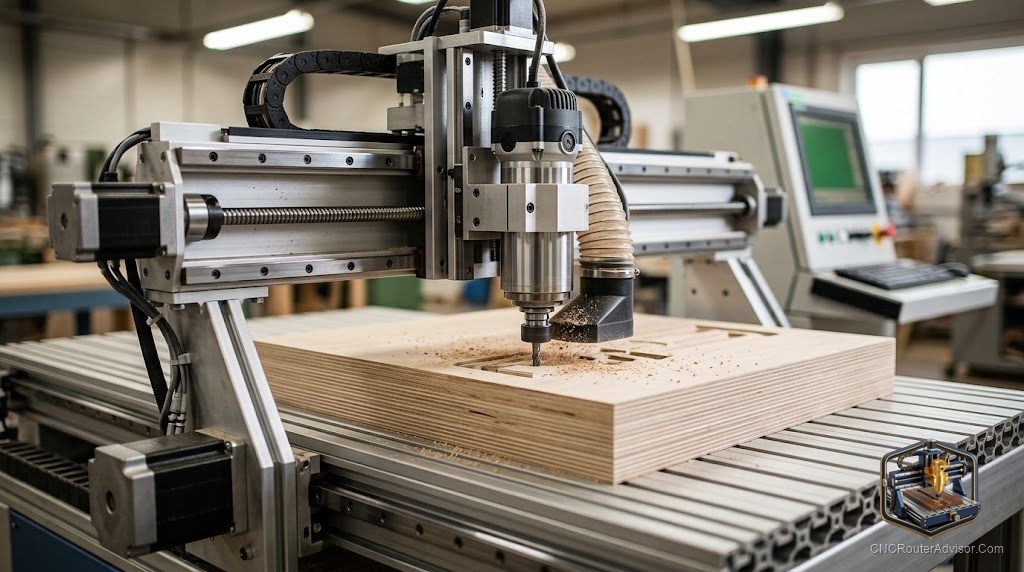
Few questions are simpler to ask and harder to answer well. Most definitions either stop too early, just a machine that cuts things automatically, or go too deep into technical detail that a newcomer cannot yet use. A useful definition of a CNC router explains what it is, what its main components are, and how they work together, so that the answer is actually a foundation for learning to use or buy one, rather than a phrase you have to look up again in ten minutes.
A CNC router is a computer numerically controlled machine that uses a spinning cutting tool, the router or spindle, moved along a programmed path by a motion system, to cut, carve, engrave, and profile materials like wood, plastic, foam, and composites. CNC means the path is controlled by a computer program rather than by a human hand, making the machine accurate, repeatable, and capable of producing complex shapes automatically.
Here is the direct definition: a CNC router is the combination of a controller (which reads a digital program), a motion system (which moves the cutting tool in three or more axes), a spindle (which rotates the cutting tool), and a rigid frame (which holds everything in place), all working together to convert a computer file into a physical cut. The sections below cover each component and how the system comes together.
The controller: reading the program
The controller is the brain of the machine. It reads G-code, a standardized set of instructions that describe the tool’s path, spindle speed, and feed rate, and translates those instructions into precise movement commands for the machine’s motors. GRBL is the standard open-source firmware for hobby CNC controllers. The controller does not know what is being made; it only knows where to move the tool and how fast, so the quality of the input program and the accuracy of the calibration determine the quality of the cut.
The motion system: moving the tool
The motion system moves the spindle in X (left and right), Y (forward and back), and Z (up and down) axes, and sometimes a fourth rotational axis. It is built from linear guides or rails, drive screws or belts, and stepper or servo motors. Belt drives are common in entry machines, affordable and easy to maintain. Lead or ball screws paired with linear rails offer higher precision and less play, suited to furniture parts and tight tolerance work. The motion system’s quality and stiffness directly affect accuracy and finish.
The spindle: the cutting tool holder
The spindle rotates the cutting bit at high speed, typically between 10,000 and 30,000 RPM for wood and similar materials. A trim router (like a Makita or DeWalt) is common in hobby machines, inexpensive and easy to source bits for. A dedicated CNC spindle, either air or water cooled, is quieter, more precise, and better for sustained production work. The spindle is matched to the collet, which holds the bit, so the shank diameter of your bits must match the collet size.
The frame: the foundation
The frame holds the motion system and spindle rigid during cutting so that cutting forces do not move the tool off its programmed path. A stiffer, heavier frame cuts more accurately and with better finish, especially in harder materials. Frames are made from laser-cut wood (light and affordable), aluminum extrusion (stiff and adjustable), or welded steel (the stiffest and heaviest). Rigidity is the one component property you cannot add after building or buying.
How they come together
A CNC job starts with a design file, which is processed by CAM software into G-code. That G-code is sent to the controller, which drives the motion system to move the spindle and bit through the programmed path. The frame holds everything rigid as the bit removes material. The result is a physical part that matches the design file, produced repeatedly and accurately without hand guidance.
For a detailed look at what a CNC router does with these components, see our guide to what does a CNC router do.
Final verdict
A CNC router is four systems working together: a controller that reads a digital program, a motion system that moves the spindle precisely, a spindle that rotates the cutting tool, and a rigid frame that holds everything in place against cutting forces. Understanding each component is what lets you evaluate a machine intelligently, diagnose problems correctly, and improve your results systematically. The machine is sophisticated in detail but simple in principle, and that simplicity is what makes it so broadly useful.
FAQ
What is a CNC router? A computer numerically controlled machine that moves a spinning cutting tool along a programmed path to cut, carve, engrave, and profile materials like wood, plastic, foam, and composites.
What does CNC stand for? Computer Numerical Control. It means the machine’s path is controlled by a computer program, which gives it accuracy and repeatability that manual hand-guided operation cannot match.
What are the main components of a CNC router? A controller (reads the program and commands the motors), a motion system (moves the spindle in X, Y, and Z axes), a spindle (rotates the cutting bit), and a rigid frame (holds everything in place).
What is G-code? G-code is the standardized programming language that describes the tool’s path, feed rate, and spindle speed. It is generated by CAM software from a design file and read by the controller.
What is the difference between a trim router and a CNC spindle? A trim router is inexpensive and easy to source bits for, suited to hobby use. A CNC spindle is quieter, more precise, and designed for sustained production use, typically requiring a VFD for speed control.
Why does frame rigidity matter? A rigid frame holds the motion system and spindle in place against cutting forces. A flexing frame lets the tool wander off its path, producing poor accuracy and finish regardless of how good the other components are.
References
- GRBL project, controller and G-code documentation: https://github.com/gnea/grbl/wiki
- Carbide 3D, CNC fundamentals documentation: https://carbide3d.com
- Autodesk, CNC overview and component reference: https://www.autodesk.com