
DIY CNC Router: Build Approaches, Parts, Skills, and What to Expect
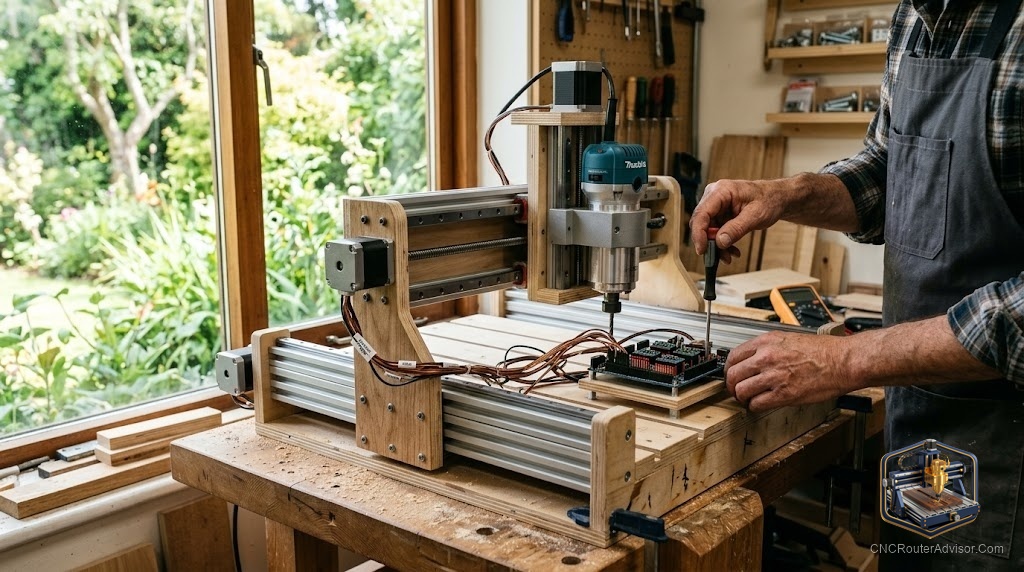
There are two very different reasons people decide to build a CNC router themselves. Some want to save money. Others want to understand the machine so completely that nothing about it is a mystery, so that when a motor stalls or a cut goes wrong, they know exactly which system to check. The second group tends to be happier, because a DIY CNC is an education you can also cut wood with. Knowing which builder you are, and what a build actually involves, sets you up to succeed rather than stall with a half-finished frame.
Building a DIY CNC router means assembling your own machine from parts rather than buying one ready-made, whether from a kit or from individually sourced components. The appeal is lower cost, deep understanding of the machine, and full customization. It requires mechanical assembly, basic wiring and electronics, and some software configuration, along with patience for tuning. Understanding the build approaches, the parts involved, the skills needed, and the realistic expectations helps you decide whether to build and how.
Short answer: a DIY CNC router is one you assemble yourself, either from a kit of matched parts or from individually sourced components. It offers lower cost, deep understanding, and customization in exchange for assembly, basic wiring, software setup, and patient tuning. Kits are the easier path since parts are guaranteed to fit; scratch builds offer more freedom but require sourcing compatible components. Either way, careful square assembly and calibration decide the result.
Two build approaches
- Kit build. A package of matched, engineered parts you assemble. Easier because compatibility is guaranteed and instructions are provided. The best path for most first-time builders.
- Scratch build. You design or follow a plan and source components individually. More freedom and often lower cost, but you must ensure all parts work together.
Kits trade some cost and freedom for a far smoother build.
The parts of a CNC router
Every build, kit or scratch, includes the same core systems:
- Frame. Aluminum extrusion or steel, providing the rigidity that sets cut quality.
- Motion system. Linear rails or V-wheels and bearings guiding movement.
- Drive. Lead screws, ball screws, or timing belts turned by stepper motors (NEMA 17 or NEMA 23).
- Electronics. A controller (often GRBL-based), stepper drivers, wiring, and a power supply.
- Spindle or router, with a mount.
- Workholding and spoilboard.
Understanding these systems is what a DIY build teaches you.
Skills you need
A DIY build asks for accessible skills:
- Mechanical assembly, working square and following instructions carefully.
- Basic wiring and electronics, connecting a controller, drivers, motors, and power per a diagram.
- Software configuration, setting steps, limits, and homing, plus learning CAD/CAM.
- Patience for tuning, calibrating and dialing in feeds and speeds on scrap.
None require an engineering degree, but all reward care.
Build steps in outline
- Assemble the frame, squaring it carefully, since errors compound.
- Install the motion system, checking smooth, even travel.
- Fit the drive and stepper motors, setting tension or preload.
- Mount the spindle or router.
- Wire the electronics, following the diagram closely.
- Configure the controller and software, setting steps, limits, and homing.
- Square, calibrate, and test cut on scrap.
What to realistically expect
Be honest before starting:
- Time. A build takes real hours, and tuning continues after first power-up.
- Troubleshooting. Something will need adjusting; the community and documentation are your friends.
- Cost. Often lower than buying, but sourcing a spindle, software, and dust collection adds up.
- Reward. You end with a machine you understand completely and can repair and upgrade yourself.
If you enjoy building and learning, the payoff is large; if you only want to cut immediately, a ready-made machine may suit you better.
The bottom line
A DIY CNC router is equal parts machine and education: you trade assembly time, basic wiring, software setup, and patient tuning for lower cost, full customization, and a machine you understand down to the bolt. Kits smooth the path with matched parts; scratch builds offer more freedom at the cost of sourcing. Either way, square, careful assembly and honest calibration decide your results. Know which builder you are, set realistic expectations, lean on the community, and you will end up with a capable machine and the knowledge to keep it running for years.
FAQ
What is a DIY CNC router? A CNC router you assemble yourself from parts rather than buying ready-made, either from a kit of matched components or from individually sourced parts.
Is it cheaper to build a CNC router? Often yes, especially a scratch build, though sourcing a spindle, software, and dust collection adds up. The bigger payoff is understanding and customization.
Should I build from a kit or from scratch? Kits are easier since parts are guaranteed to fit and instructions are included. Scratch builds offer more freedom but require sourcing compatible components.
What skills do I need to build one? Mechanical assembly, basic wiring and electronics, software configuration, and patience for tuning. None require an engineering degree, but all reward care.
What parts make up a CNC router? A frame, motion system, drive and stepper motors, electronics and controller, a spindle or router, and workholding.
How long does a build take? Real hours over one or more sessions, plus ongoing tuning after first power-up. Working carefully and square matters more than working fast.
Is a DIY CNC router good for beginners? Yes, if you enjoy building and learning, especially from a kit. If you only want to start cutting immediately, a ready-made machine may suit you better.
References
- CNCRouterInfo, how to choose a CNC router: https://cncrouterinfo.com/guides/how-to-choose-a-cnc-router/
- Instructables, DIY CNC router: https://www.instructables.com/DIY-CNC-Router/