
3D Printed CNC Router Explained: Uses, Setup, and Key Considerations
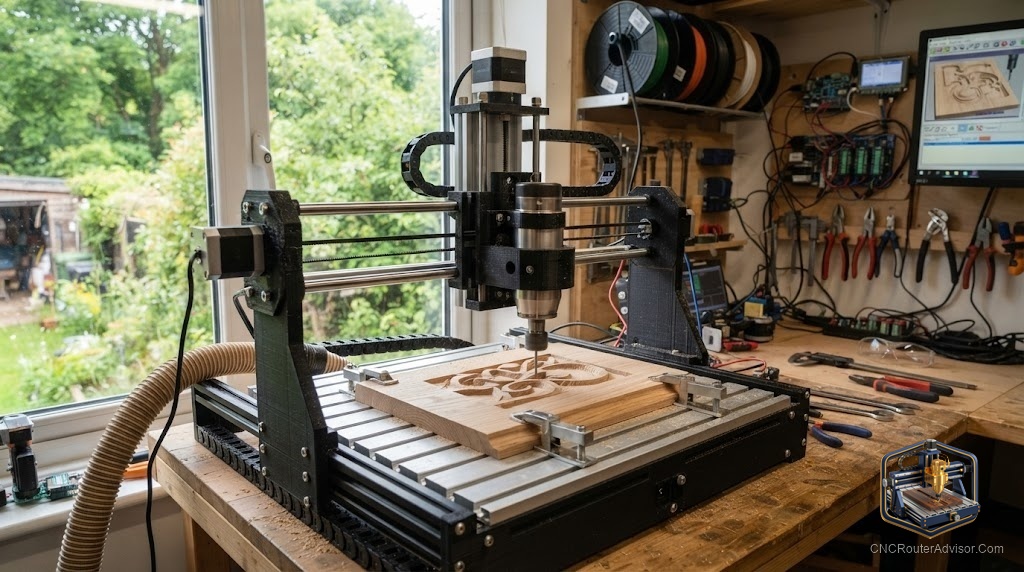
There is a certain kind of maker who looks at a CNC router and thinks, I could build that myself, and then looks at their 3D printer and thinks, with this. It is a tempting idea. You already own the machine that can make custom brackets, mounts, and structural parts, so why not print the frame of a CNC router and bolt on some motors and rails? People do exactly this, and the results range from delightful to disappointing depending on how honest they were with themselves about one thing: rigidity.
A 3D printed CNC router is a machine whose structural parts, the brackets, motor mounts, gantry components, and joints, are printed in plastic rather than machined from metal or cut from extrusion. These builds usually combine printed parts with off-the-shelf hardware like aluminum extrusion, steel rods, linear rails, lead screws, stepper motors, and a GRBL controller. They are a popular entry into building your own CNC.
Short answer: a 3D printed CNC router is a great learning project and works well for engraving and light cutting in wood, foam, and plastic, as long as you accept that printed plastic flexes more than metal. It is not the machine for aggressive cuts, aluminum production, or high-speed work. Print the parts that can afford to flex, and use metal for the parts that carry load.
Why people build them
The appeal is real. You get a low-cost, highly customizable machine, you learn how CNC works from the ground up, and you can repair or upgrade any part by printing a new one. For understanding motion systems, controllers, and G-code, few projects teach more than building your own. Popular open-source designs have proven that a mostly-printed machine can produce genuinely good work within its limits.
The rigidity question
Everything about a 3D printed CNC comes back to one truth: plastic is less stiff than metal. Cutting forces try to deflect the frame, and any deflection shows up as inaccuracy, chatter, and a poor finish. That does not make printed machines useless; it defines where they excel and where they struggle.
The smartest designs minimize the load carried by plastic. They use metal for the parts under the most stress, such as steel rods or rails for the axes and metal screws for drive, and reserve printed parts for brackets, mounts, and joints where geometry matters more than raw stiffness. Print orientation, infill density, and material choice all affect how much a part flexes, so quality prints matter.
What it does well
A well-built printed CNC handles:
- Engraving and light carving in wood.
- Cutting foam, soft plastics, and thin sheet goods.
- PCB milling and light detail work.
- Learning and prototyping of all kinds.
What it struggles with is deep aggressive cuts, hardwood at speed, and any aluminum work beyond the lightest touch. Push a printed frame hard and it flexes, and the results tell on you immediately.
Setup essentials
- Print quality. Use a rigid filament and high infill for load-bearing parts, and print in the orientation that keeps layer lines from splitting under stress. Weak layer adhesion is a common failure point.
- Metal where it counts. Steel rods or linear rails for the axes, and metal lead screws or ball screws for drive, make the difference between a toy and a tool.
- Controller. A GRBL controller board is the standard, running open-source firmware that is well documented and beginner-friendly.
- Squaring and tramming. As with any build, take time to square the axes and tram the spindle. A printed machine can be accurate if you dial it in.
- Conservative cuts. Shallow depths, moderate feeds, and sharp bits keep forces low so the frame stays honest.
Who should build one
Build a 3D printed CNC if you enjoy the build as much as the cutting, want an affordable and customizable machine for light work, and value learning how everything fits together. Skip it if you need production reliability, heavy material removal, or metal cutting out of the box; for that, buy a rigid metal-framed machine.
The bottom line
A 3D printed CNC router is one of the best learning projects in the hobby, and within its limits it does real work in wood, foam, and plastic. The whole game is respecting rigidity: put metal where the loads are, print the brackets and mounts, keep cuts light, and dial in the setup. Do that and you get a capable, endlessly customizable machine. Expect it to cut steel or push hard, and it will disappoint.
FAQ
Is a 3D printed CNC router any good? Yes for engraving and light cutting in wood, foam, and plastic. Its limit is rigidity, so it is not for heavy or metal work.
Can it cut aluminum? Only the lightest touch, if at all. Printed frames flex too much for reliable aluminum work.
What materials should the frame use? Use metal, such as steel rods or rails and metal screws, for load-bearing parts, and print brackets, mounts, and joints.
What controller do these use? Most run a GRBL controller board with open-source firmware, which is well documented and beginner-friendly.
Will it be accurate? It can be accurate for light work if squared and trammed well and if cuts stay conservative. Deep cuts introduce flex and error.
Is it cheaper than buying a machine? Usually cheaper in parts, but you pay in build time and learning. The value is in customization and understanding.
What can I make with one? Signs, engravings, light carvings, foam and plastic parts, PCBs, and plenty of learning projects.
References
- CNCRouterInfo, how to choose a CNC router: https://cncrouterinfo.com/guides/how-to-choose-a-cnc-router/
- CNC Dad, best CNC router for beginners: https://www.cnc-dad.com/blog/best-cnc-router-for-beginners/