
Xstech Pro CNC Router/mill Explained: Uses, Setup, and Key Considerations
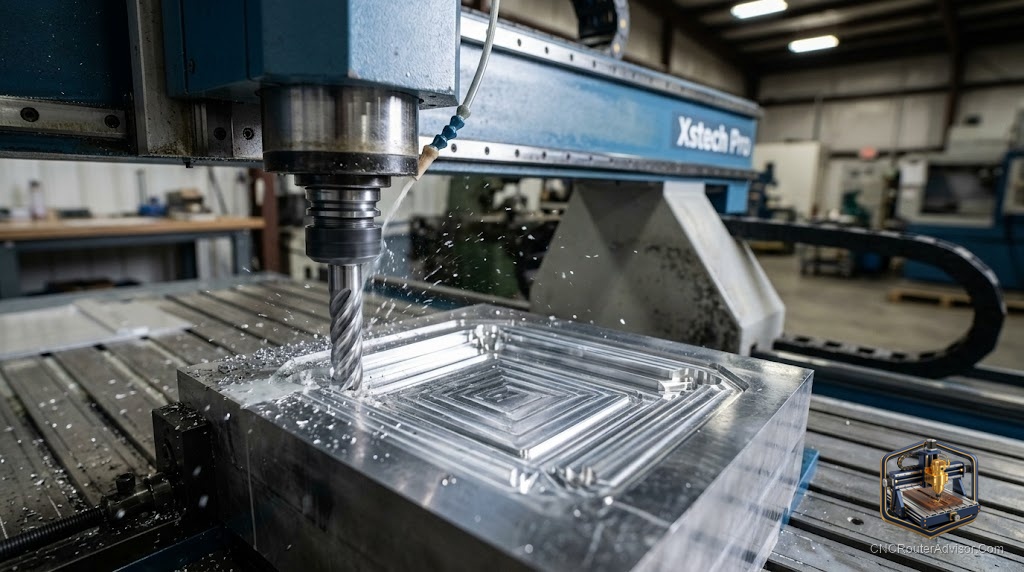
Most desktop CNC machines ask you to pick a side: a friendly hobby router that cuts wood and plastic, or a rigid little mill that fights aluminum. The Tormach xsTECH Pro tries to sit in the middle, and it does something unusual for a machine this small. It ships with a real automatic tool changer, a full enclosure, and industrial control software, all packaged for classrooms and makerspaces where safety and repeatability matter as much as raw capability.
The xsTECH Pro is a compact desktop CNC router and mill made by Tormach, a US manufacturer known for benchtop machining. It is the next generation of the earlier xsTECH Router, redesigned around education and training with a safety enclosure, a four-station automatic tool changer, and Tormach’s PathPilot control system. It cuts wood, plastics, and aluminum in a footprint that fits on a countertop.
Short answer: the xsTECH Pro suits schools, STEM labs, makerspaces, and small prototyping benches that want a safe, fully enclosed machine with real automatic tool changing and professional control software. It is not a low-cost hobby router; its value is in the enclosure, the tool changer, and the classroom-ready workflow, so budget-focused makers should look at open-bench desktop machines instead.
What makes it different
Most machines its size are open-frame hobby units. The xsTECH Pro brings several features usually found on larger equipment:
- Four-station automatic tool changer. It swaps between tools during a job with no manual intervention, so multi-step operations run start to finish unattended. This is rare at this size and a genuine time saver for teaching multi-tool workflows.
- Full safety enclosure. Windows on three sides with task lighting contain chips and dust while letting a group watch a cut. For a classroom, this is the headline feature.
- PathPilot control. Tormach’s industrial control system, with a touchscreen, Wi-Fi, conversational programming, and PathPilot Hub for file transfer and offline simulation so students can test code without a machine.
- Ballscrews and linear guides on all axes for accuracy and repeatability.
Specifications
- Spindle: 350W with an ISO 10 taper and ER11 collets, spinning up to 20,000 RPM.
- Work area: roughly 12 by 9 by 6.5 inches, with the tool changer installed reducing X travel slightly.
- Precision: spindle runout under about 0.0008 inch and repeatability around plus or minus 0.001 inch.
- Power and air: runs on standard single-phase household power and requires shop air of roughly 90 to 120 psi for the tool changer.
- Footprint and weight: fits on a 24 inch countertop, weighs about 150 pounds, and arrives largely assembled.
- Extras: supports probing and fourth-axis machining.
Uses
The machine earns its keep teaching CNC fundamentals: setting work coordinates, running toolpaths, managing tool changes, and simulating programs before cutting. Beyond the classroom it handles light prototyping, small parts, jewelry-scale work, engraving, and light aluminum with the right tooling and settings. The air-powered tool changer makes it a strong platform for demonstrating real production workflows on a small scale.
Setup considerations
Because the tool changer is pneumatic, you need a compressed air supply, which some home users overlook. The 350W spindle is modest, so aluminum work means shallow passes and patient feeds rather than heavy cuts. And while the machine is capable, its real strength is the safety and workflow package, not maximum material removal. Budget buyers should weigh that carefully.
Who should buy, and who should skip
Buy it if you run an education or training program, a makerspace, or a prototyping bench where enclosure safety, automatic tool changing, and professional control software justify the cost. Skip it if you are a hobbyist who mainly wants to carve wood signs cheaply, since an open-bench desktop router delivers more work area per dollar without the enclosure and tool-changer premium.
The bottom line
The xsTECH Pro is a teaching and prototyping machine that packs a genuine automatic tool changer, a full enclosure, and industrial control software into a countertop footprint. Those features, not headline horsepower, are what you pay for. For classrooms and makerspaces it is a compelling, safe, capable platform. For pure hobby carving on a budget, simpler desktop routers make more sense.
FAQ
Who makes the xsTECH Pro? Tormach, a US manufacturer of benchtop CNC machines. It is the successor to the xsTECH Router.
Is it a router or a mill? Tormach markets it as a router and mill. With a 350W high-speed spindle it behaves like a router but is rigid and precise enough for light milling in aluminum.
Does it really change tools automatically? Yes. A four-station pneumatic automatic tool changer swaps tools mid-job, which is unusual for a machine this small.
Do I need an air compressor? Yes. The tool changer is air-powered and needs roughly 90 to 120 psi shop air.
Can it cut aluminum? Yes, with shallow passes, appropriate feeds, and the right tooling. The 350W spindle limits how aggressive you can be.
What software does it use? Tormach’s PathPilot, including conversational programming and the PathPilot Hub for offline simulation and file transfer.
Is it good for a home hobbyist? It can be, but its enclosure and tool-changer value target education and training. Budget hobbyists get more work area per dollar from open-bench routers.
References
- Tormach, xsTECH Pro product page and spec sheet: https://tormach.com/machines/routers/xstech-pro-cnc-router.html
- Tormach, xsTECH Pro specification sheet (PDF): https://tormach.com/docs/download/assetlink/asset_id/881