
3-Axis Router CNC Guide: Capabilities, Applications, and Buying Factors
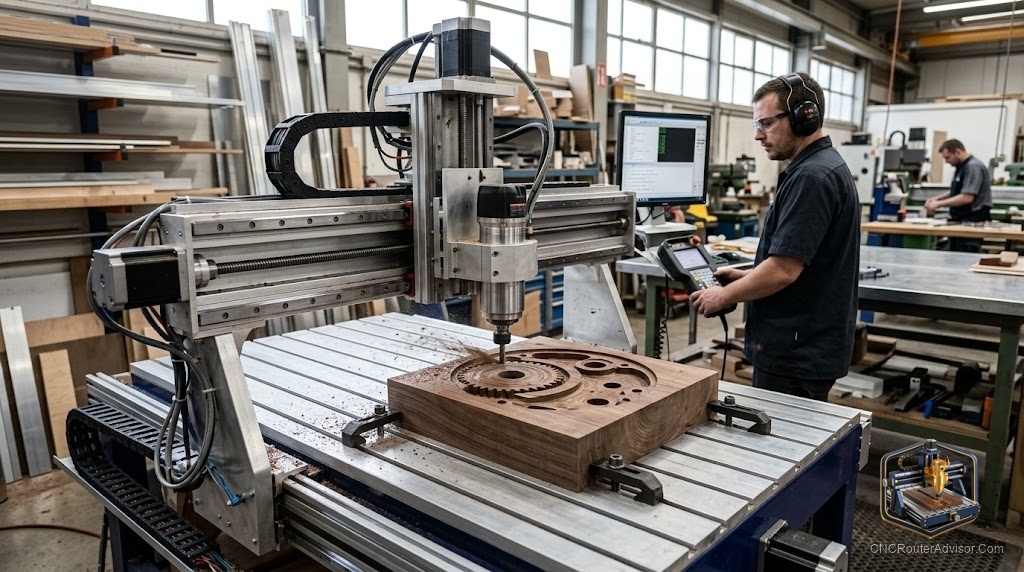
Three axes sound limiting until you realize how much work fits inside them. The X axis, Y axis, and Z axis give a CNC router everything it needs to cut signs, furniture parts, inlays, enclosures, carvings, and most of what makers and small shops actually make. The conversation about adding axes matters only when three leave something important on the table, and for most people, they do not. Understanding what three axes actually buy you, and where the geometry stops working, is the clearest path to buying or building the right machine.
This guide covers 3-axis capability, real applications, the specifications that predict clean motion, and where 4-axis or 5-axis becomes worth considering.
What 3-axis means on a CNC router
A 3-axis router moves in three independent linear directions. The X axis runs the length of the machine, the Y axis across the gantry, and the Z axis moves the spindle up and down. The cutter approaches the material from above and moves in any combination of those three directions at once. That is enough to cut any flat shape, any profile, any pocket, and any surface that can be approached from the top.
The motion system driving those axes, whether ball screws, lead screws, timing belts, or rack and pinion on linear rails or V-wheels, determines how precisely and repeatably the machine follows its path. Good motion means the hundredth part matches the first. Worn or sloppy motion shows in chatter, inaccuracy, and poor finish.
The short answer
For the vast majority of CNC router work, three axes are all you need. Signs, panels, furniture parts, carvings, pockets, inlays, engraving, and most production work sit comfortably in three axes. The reason to add a fourth or fifth axis is geometry you genuinely cannot reach from above: a part that needs a rotary operation, undercuts that cannot be approached without tilting the cutter, or sculptural forms that require the head to swivel. Those are real applications, but they are a small fraction of what most shops actually produce. Buy three axes, master them, and let a genuine need pull you further.
Applications that fit three axes
Wood signs and lettering are the obvious ones, because the cutter traces a design path across a flat surface. Furniture parts are well served because panel cutting, dadoes, mortises, and pockets all approach from the top. Relief carvings, which vary the Z depth to create surface texture and three dimensional appearance, are three axis work, even though the result looks deep. Enclosures and fixtures in plastic, light aluminum brackets and faceplates, and engraved plaques are all standard three axis jobs. The common feature is that everything the cutter needs to reach is accessible from above.
What three axes cannot do well
Three axes cannot reach undercuts, meaning surfaces that face sideways or downward, without flipping and refixturing the part. True sculptural forms that curve back under themselves need a rotary or tilting axis to access. Production parts that would benefit from being machined on multiple faces in one setup also push you toward more axes. These are real limits, but most hobbyists and small shops can design around them or accept a refixture step, so they rarely justify the cost and complexity of adding axes.
The buying factors that matter in a 3-axis machine
Motion system quality defines performance. Ball screws on quality linear rails hold position, fight backlash, and keep accuracy consistent over time. Timing belts and V-wheels cost less and suit lighter work, but they give up some precision and wear faster. Positioning accuracy, repeatability, and steps per unit all depend on the drive mechanism, so read these before you buy.
Rigidity follows. A stiff frame lets the machine use its motion system to full effect, especially over a larger work area. A frame that flexes undermines the finest motion system beneath it.
Z travel is the third consideration often overlooked. How high above the material the cutter can reach determines the thickness of material you can clamp and the height of workholding you can use. Confirm Z travel suits your projects.
Who should consider adding a fourth axis
A fourth axis, usually a rotary A axis, adds rotation around the X or Y axis and opens up cylindrical parts: turned profiles, engraved bangles, carved cylindrical signs, and spindle work that would otherwise need a lathe. If those outputs are a regular part of your work, a rotary fourth axis is a worthwhile addition to a 3-axis base. If they are rare or hypothetical, three axes serve you and a simple refixture handles the edge cases.
Comparison: 3-axis vs 4-axis vs 5-axis
| Config | Adds | Best for | Right buyer |
| 3-axis | X, Y, Z linear motion | Signs, furniture, panels, carving | Most hobbyists and shops |
| 4-axis | Rotary A axis | Cylinders, turned profiles | Those with regular cylindrical work |
| 5-axis | Two rotary axes | Complex sculpture, multi-face parts | Industrial specialist shops |
For a well supported 3-axis desktop machine, the Genmitsu PROVerXL 4030 covers most hobby and small shop work at this listing. A metal framed, more rigid 3-axis option is the Genmitsu 3030 PROVer Ultra at this listing. For a 4-axis capable base, the Genmitsu PROVerXL 4030 with a rotary axis attachment is available at this listing.
The verdict
A 3-axis CNC router is the right machine for most makers, hobbyists, and small shops because the work those shops actually do fits comfortably in three axes. Signs, carvings, furniture parts, panels, engraving, and light metal work all live there. The motion system quality, the frame rigidity, and Z travel are the specifications that decide whether a 3-axis machine does that work well or poorly. Buy a machine with a quality motion system and a stiff frame, sized to your projects, and three axes will serve you for a long time. Move to four or five only when real, repeated work demands geometry you genuinely cannot reach from above.
Frequently asked questions
What can a 3-axis CNC router not cut? Undercuts, meaning surfaces that face sideways or downward, and true multi-face parts in one setup. These need a fourth or fifth axis, or flipping and refixturing the part. For most work, refixturing is the practical answer.
Is a 3-axis router enough for woodworking? Yes for almost all woodworking. Signs, carvings, furniture parts, panels, joinery, and inlays all work in three axes. The geometry of most wood parts is designed to be cut from above.
What is the difference between ball screws and lead screws? Ball screws use rolling elements for very low friction and backlash, giving high accuracy and long life. Lead screws use sliding contact, which is cheaper but has more friction and backlash. For precision work, ball screws are worth the extra cost.
How does Z travel affect what I can cut? Z travel sets how high above the bed the cutter can reach, which determines the maximum material thickness and workholding height you can use. Confirm it suits your thickest material before buying.
When does a 4th axis make sense? When you regularly need to cut cylindrical parts like carved bangles, engraved rolling pins, or turned profiles, a rotary 4th axis adds that capability without leaving the 3-axis workflow. For rare cylindrical work, refixture is usually fine.
Can I add a 4th axis to a 3-axis machine later? Many 3-axis machines support a rotary axis attachment as an upgrade, especially those running GRBL and a controller with a spare axis channel. Confirm compatibility before buying if rotary work is a plan.
References
- CNC Dad, Best CNC Router for Beginners: https://www.cnc-dad.com/blog/best-cnc-router-for-beginners/
- WorkshopCalc, Best CNC Routers guide: https://workshopcalc.com/guides/best-cnc-routers