
CNC Machine Router: Features, Specs, and Buying Considerations
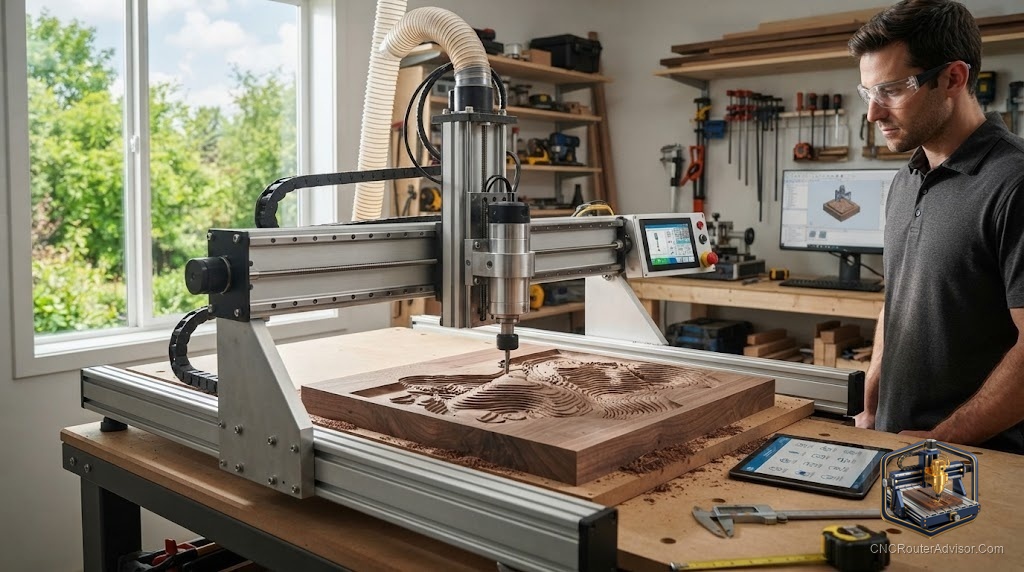
The phrase “CNC machine router” gets typed by two very different people. One is a beginner who is not yet sure what the machine even is. The other is someone comparing options and trying to decode a spec sheet full of terms nobody explained. This guide is written for both, because the honest answer to “which one should I buy” starts with understanding what you are actually looking at.
I have set up enough of these machines to know that the specification that sells a router is rarely the specification that determines whether you enjoy owning it. Let me walk you through what matters, in the order it actually matters.
What a CNC router is
A CNC router is a machine that uses Computer Numerical Control to move a spinning cutting tool across three axes. The X axis moves left and right, the Y axis moves front to back, and the Z axis moves up and down. A computer reads a file of coordinates called G-code and drives the spindle along those paths to carve wood, plastics, foam, and soft metals into a finished part.
Think of it as a very precise, very patient robotic hand holding a router. You design a part, software turns that design into toolpaths, and the machine reproduces it exactly, again and again. That repeatability is the whole point. A skilled person with a handheld router can make one good sign. A CNC router can make fifty identical ones while you do something else.
The short answer for buyers
If you are choosing a CNC router, match the machine to your material and your space before you fall in love with any single number. For general woodworking and signs, a mid-size desktop router with a stiff frame is the sweet spot. For small detailed work and learning, a compact desktop machine keeps cost and footprint low. For hard materials and metal, you need rigidity above all, which means ball screws, linear rails, and a real spindle rather than a trim router.
The machines most people should shortlist span a clear range. Compact learners like the Genmitsu 3018-PROVer V2, mid-size workhorses like the Genmitsu 4040-PRO MAX, and metal-capable machines like the Genmitsu 3030-PROVer Ultra cover the majority of home needs. Premium woodworking routers from Carbide 3D, Onefinity, and Sienci sit above them for people who want more rigidity and support. The rest of this guide explains how to tell which tier is yours.
The specifications that actually matter
Work area
Work area is the size of the largest part you can cut, measured in X, Y, and Z. It is the most visible spec and the most misunderstood. A larger machine needs more floor space and, critically, more structure to stay accurate across that larger span. Buy the work area you need plus a little room to grow, not the biggest number you can afford.
Frame rigidity
Rigidity is the single best predictor of cut quality, and it barely appears in marketing. A stiff frame resists the flex that causes chatter, rough edges, lost steps, and broken bits. Steel frames and heavy aluminum extrusion beat light extrusion. If two machines look similar on paper but one weighs far more, the heavier one usually cuts better.
Motion system
The motion system is how the gantry moves. Timing belts are cheap, quiet, and fine for wood, but they can stretch and lose a little precision under load. Lead screws are a step up. Ball screws are stiffer and more accurate, and paired with linear rails they define the higher tier. More rigid motion means cleaner cuts in harder material.
Spindle power
Many hobby machines use a trim router as the cutter, which is loud but proven and cheap to replace. Higher machines use a variable frequency drive spindle, quieter and more controllable, often rated around 700 watts and up. More power lets you cut faster and in tougher material, but only if the frame can hold the tool steady while it does.
Controller and software
Most hobby routers run GRBL firmware and accept G-code from common design programs. Confirm the machine works with software you are willing to learn and that its post-processor matches its controller. A great machine with a mismatched toolchain still produces failed cuts.
Where each tier fits
| Tier | Motion system | Best materials | Example |
| Compact learner | Lead screw or belt | Engraving, light wood, plastic | Genmitsu 3018-PROVer V2 |
| Mid-size woodworker | Lead screw or linear rail | Signs, furniture parts, plywood | Genmitsu 4040-PRO MAX |
| Metal-capable desktop | Ball screw plus linear rails | Aluminum, hardwood, acrylic | Genmitsu 3030-PROVer Ultra |
| Premium woodworking | Linear rails, stiff frame | Production woodworking | Shapeoko Pro, Onefinity |
The compact learner keeps risk and cost low: Check on Amazon . The mid-size MAX adds linear rails and a stronger spindle for real woodworking: Check on Amazon . The metal-capable Ultra brings ball screws and a 710 watt spindle for aluminum: Check on Amazon
Where CNC routers disappoint people
The most common regret is buying for work area and ignoring rigidity, then wondering why the edges look rough and bits keep snapping. The second is underestimating noise and dust. A trim router in a small room is loud, and cutting wood produces fine dust that demands collection and ventilation. The third is assuming the machine is the whole cost. Bits, workholding, dust control, and software all add up, and a machine bought at the edge of your budget leaves nothing for the accessories that make it usable.
Who should skip a full-size router
If you live in an apartment, cut mostly small items, and value quiet, skip the large machines and pick a compact desktop unit. If you only ever plan to engrave, you may not need a router at all and could look at a smaller engraver. And if you want metal work, skip the tempting large woodworking machines with light frames, because span without stiffness is the wrong trade for aluminum.
The verdict
A CNC router is one of the most rewarding tools you can own, but only if you buy the right tier for your material and space. Choose rigidity over raw work area, confirm the software fits how you want to work, and leave budget for the accessories the machine needs to do real work. For most home users, a mid-size machine with a stiff frame is the pick that stays useful for years. For metal, prioritize ball screws and a real spindle. For learning, a compact desktop keeps the stakes low while you build skill.
Buy for the parts you will actually make, not the parts you imagine making, and the machine will earn its bench space.
Frequently asked questions
What can a CNC router cut? Wood, plywood, MDF, plastics like acrylic and HDPE, foam, and soft metals such as aluminum on rigid machines. Harder metals need a mill rather than a router.
How is a CNC router different from a CNC mill? Routers spin fast and move quickly across large flat material, ideal for wood and sheet goods. Mills are heavier, slower, and built for metal. Rigidity and spindle speed are the main differences.
What spindle power do I need? For wood and plastic, a trim router or a spindle in the few-hundred-watt range is fine. For aluminum and faster hardwood cutting, a 700 watt or larger spindle on a stiff frame is better.
Do CNC routers need special software? Yes. You design in CAD, generate toolpaths in CAM, and send the G-code with a controller program. Many hobby machines use GRBL and work with common free and paid software.
How much space does a CNC router need? More than the work area suggests, since the gantry and frame extend beyond it and you need room to load material and manage dust. Measure your bench before buying.
Is a CNC router loud? Machines using a trim router are loud, and all of them produce dust. Plan for hearing protection, dust collection, and ventilation from the start.
References
- CNCRouterInfo, how to choose a CNC router: https://cncrouterinfo.com/guides/how-to-choose-a-cnc-router/
- CNC Dad, best CNC router for beginners: https://www.cnc-dad.com/blog/best-cnc-router-for-beginners/
- Genmitsu / SainSmart machine specifications: https://www.sainsmart.com