
6090 CNC Router Price Guide: What Drives Cost, Features, and Value
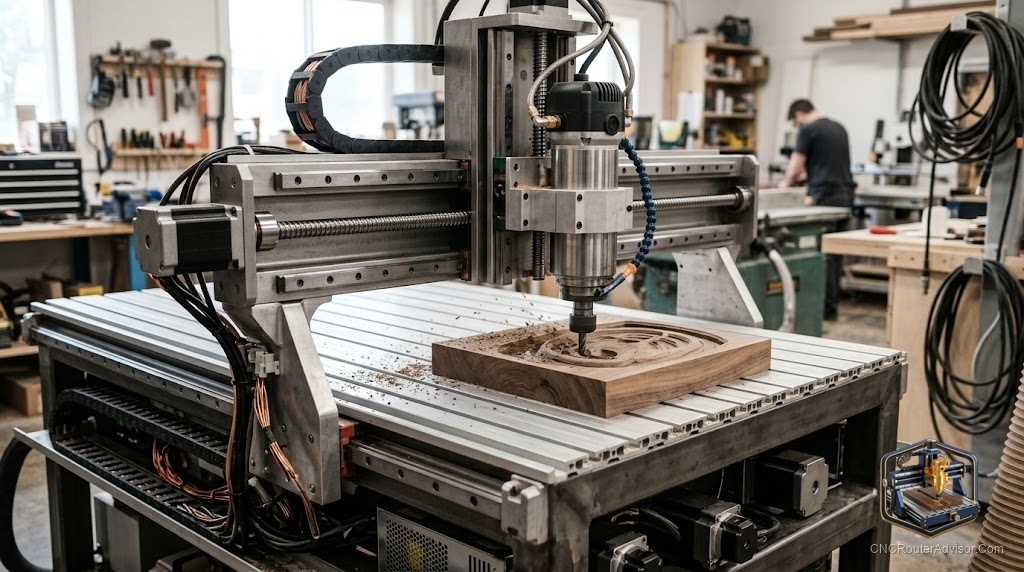
You found a 6090 CNC router that looks identical to one selling for far more, and now you are stuck. Same product photo, same 600 by 900 bed, same shiny spindle poking through the gantry. So why does the 6090 CNC router vary so hard from one listing to the next? The answer is rarely marketing. It is what sits under the paint: the frame, the screws, the spindle, and the controller. This guide breaks down what actually sets the cost so you can judge value instead of guessing.
A 6090 CNC router is a compact, computer-controlled cutting machine named for its work area, roughly 600mm by 900mm (about 2 feet by 3 feet). It sits between a tiny desktop CNC router and a full 4 by 8 industrial CNC router machine. People buy one for signage, cabinet doors, inlays, PCB and mold work, and light aluminum.
What drives 6090 CNC router value? Cost is set mostly by frame material and rigidity, the motion system (ball screw versus lead screw versus belt), spindle type and power, the controller, and support plus shipping. Two machines with the same bed size can vary significantly because one uses a stiffer frame, ball screws, and a water-cooled spindle while the other saves money on all three. Match those parts to your work, and you stop overpaying for specs you will never use.
What is a 6090 CNC router, and who is it for?
A 6090 is a benchtop-class router built around a 600 by 900mm cutting area, usually with 100mm to 200mm of Z travel. It runs G-code, moves a spindle across three axes (some add a fourth rotary axis), and carves wood, acrylic, PVC, MDF, foam, and soft metals like aluminum and brass.
It suits a specific buyer. You have outgrown a small hobby machine, you want repeatable parts, and you do not have the floor space, power, or budget for an industrial format. Sign makers, furniture shops, prototypers, and schools land here often.
What drives the cost of a 6090 CNC router?
Cost tracks four parts more than anything else: the frame, the motion system, the spindle, and the controller. After that comes support, warranty, and how the machine reaches your door. A seller can hit a low number by thinning any one of these, so read the spec sheet, not the headline.
Think of cost as a stack of choices. Each upgrade (steel over aluminum, ball screws over lead screws, a bigger water-cooled spindle, a better controller) adds to the investment but also adds capability or lifespan. The trick is paying for the upgrades your work needs and skipping the ones it does not.
How much does the frame matter?
The frame matters more than almost any spec on the page, because it sets rigidity. A 6090 built from thick 6061 aluminum extrusion is light, accurate enough for wood and plastic, and easy to ship. A welded steel or steel-reinforced frame resists flex under load, which shows up as cleaner cuts and less chatter in dense hardwood and metal.
Rigidity is why two 6090s with the same spindle can produce very different edges. A flexy gantry deflects when the bit pushes into material, so your slot drifts and your finish suffers. If you plan to cut aluminum or take deep passes, prioritize a stiffer frame.
Ball screw, lead screw, or belt: which motion system should you pay for?
Pay for ball screws if precision and metal cutting matter, and accept lead screws or belts only for lighter work. The motion system converts motor spin into table movement, and it is one of the clearest dividing lines in 6090 purchasing decisions.
Ball screws use recirculating steel balls to cut friction, which raises efficiency above 90 percent and gives near-zero backlash for accurate, repeatable moves. Lead screws rely on sliding contact, so they run at roughly 50 to 70 percent efficiency, wear faster, and carry more backlash, though they cost less and can be self-locking. Timing belts are the least expensive and fastest, but they stretch under load, so they fit light engraving more than hard cutting.
Here is the honest read. A 6090 with ball screws on all three axes plus linear rails is worth the investment if you cut metal or need tight tolerances across a full sheet. If you carve signs and softwood, quality lead screws hold up fine and keep the total lower.
How much spindle power do you actually need?
Buy the spindle power that matches your material and pass depth, not the biggest number. A 1.5KW water-cooled spindle handles wood, acrylic, and light aluminum well. Step up to 2.2KW when you want deeper passes, faster feeds in dense material, or longer continuous runs without bogging down.
Cooling and the collet matter as much as wattage. Water-cooled spindles run quieter and stay cooler on long jobs. The collet size sets which tools fit: an ER11 spindle limits you to smaller shanks, while an ER20 accepts larger bits for heavier cutting. Most quality 6090s pair the spindle with a VFD (variable frequency drive) that controls speed, so check that it is included and correctly rated for your outlet voltage.
Does the controller change the experience?
Yes, the controller shapes how the machine feels to run day to day. Three types show up on 6090s. GRBL boards are cheap, open source, and beginner friendly, but limited for advanced jobs. MACH3 runs on a Windows PC and is common on budget imports, though it often needs an older 32-bit Windows install and extra setup. DSP handheld controllers let you run the machine without a tethered computer, which shops prefer.
None of these is wrong. A hobbyist learning on nights and weekends does fine with GRBL or MACH3. A small business running parts all day benefits from a standalone DSP or a modern controller. Just know before you buy, because swapping a controller later is real work.
Workholding, tooling, and the costs people forget
The machine is not the whole bill. Workholding (clamps, a spoilboard, or a vacuum table) keeps parts from shifting, and you will need it on day one. Bits wear out and break, so a starter set of end mills and V-bits is a running cost, not a one-time buy.
Two more factors quietly move the total: shipping and import. A 6090 is heavy and bulky, so freight is not trivial, and a US-stock listing usually beats a long overseas wait.
Comparing three verified 6090 routers on Amazon
| Machine | Spindle and collet | Work area (stated) | Best for | Watch out for |
|---|---|---|---|---|
| OCASAMI 2.2KW 4-Axis 6090 | 2200W water-cooled, ER20 | 900 x 600 x 140mm | Deeper passes, aluminum, heavier bits | Runs MACH3 on 32-bit Windows; third-party seller support is thin |
| OCASAMI 1.5KW 4-Axis 6090 | 1500W water-cooled, ER11 | 900 x 600 x 140mm | Wood, acrylic, signs, lighter work | ER11 and lower power limit big bits and deep metal cuts |
| KUMOYOU 1.5KW 4-Axis 6090 | 1500W water-cooled | 600 x 389 x 120mm | Compact engraving and small parts | Listed Y travel is far short of a true 600 by 900 bed; confirm dimensions before buying |
The pattern is clear. The two OCASAMI machines share the same full-size 6090 bed and ball-screw setup, and the choice between them comes down to spindle power and collet. The KUMOYOU carries the 6090 name, but its listed work area reads closer to 600 by 390mm.
The verdict
For most buyers who want a real 6090 with room to grow, the OCASAMI 2.2KW 4-axis is the value pick. You get the full 900 by 600 bed, ball screws on all axes, and an ER20 spindle with enough torque for deeper cuts and light aluminum. The catch is MACH3 on older Windows, so budget an afternoon for setup.
If your work stays in wood, plastic, and signs, the OCASAMI 1.5KW does the same jobs at a gentler pace, as long as the ER11 collet fits your bits.
Concrete takeaways:
- Judge a 6090 by frame rigidity, motion system, spindle, and controller, in that order, before you look at anything else.
- Pay for ball screws if you cut metal or need tight tolerances; lead screws are fine for softwood and signs.
- Match spindle power and collet (ER11 versus ER20) to your material and bit sizes, not to the biggest wattage.
- Read the stated work area in millimeters, since some machines wear the 6090 name without the full 600 by 900 bed.
FAQ
What is a 6090 CNC router used for? It cuts and engraves wood, acrylic, PVC, MDF, foam, and soft metals like aluminum and brass. Common jobs include signage, cabinet doors, inlays, molds, PCBs, and prototypes.
Why do 6090 CNC routers vary so much in what you get? Because the parts under the hood differ. Frame rigidity, ball screws versus lead screws, spindle power and cooling, and the controller each move the equation. Support, warranty, and whether the unit ships from US stock or overseas also change the total.
Is a ball screw worth it on a 6090? For metal cutting and tight tolerances, yes. Ball screws run above 90 percent efficiency with very little backlash. For softwood and sign foam, good lead screws are acceptable and keep the overall outlay lower.
Do I need a 2.2KW spindle, or is 1.5KW enough? 1.5KW handles wood, plastic, and light aluminum with reasonable pass depths. Choose 2.2KW for deeper cuts, faster feeds in dense material, larger bits, and long continuous runs.
Can a 6090 CNC router cut aluminum? Yes, within limits. A rigid frame, ball screws, a water-cooled spindle, shallow passes, and the right bit let a 6090 cut aluminum and brass.
Air-cooled or water-cooled spindle: which is better? Water-cooled spindles run quieter and hold temperature better on long jobs. Air-cooled units are simpler with no pump or coolant to manage.
What controller software do these machines use? Budget 6090s often run MACH3 on a Windows PC, sometimes requiring an older 32-bit install. Others use GRBL boards or standalone DSP handheld controllers.
Are budget Amazon 6090 routers any good? Some are solid value, especially ones with ball screws, a water-cooled spindle, and US stock. The risks are thin seller support, dated software, and listings whose stated work area does not match a true 600 by 900 bed.
References
- Thomson Linear, “Ball Screws vs Lead Screws: What is the Difference?” https://www.thomsonlinear.com/en/support/tips/ball-screws-vs-lead-screws
- Isel, “Ball Screws vs. Lead Screws: Which Is Right for Your Needs?” https://www.isel-us.com/blog/ball-screws-vs-lead-screws-which-is-right-for-your-needs