
3-Axis vs. 4-Axis CNC Router: Key Differences and Which One You Actually Need
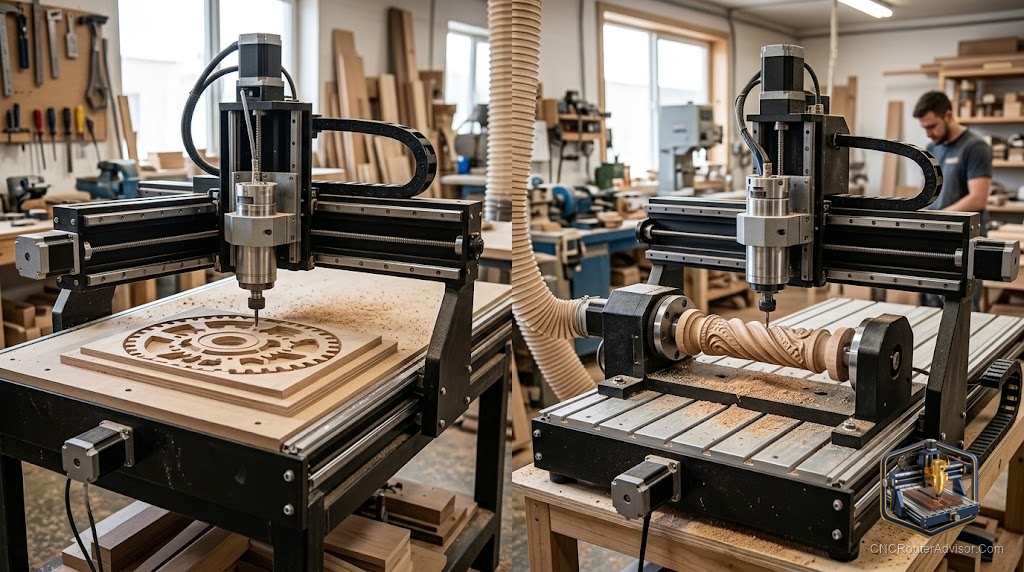
Most CNC router buyers who ask about 4-axis capability do not actually need it for the work they are planning. That is not a criticism; it is a fact about the distribution of CNC woodworking and sign-making applications. The vast majority of production CNC work - cabinet parts, signs, flat decorative panels, furniture components, 3D relief carvings - is completely achievable on a three-axis machine. A fourth axis adds genuine capability for specific applications: cylindrical engraving, round stock machining, continuous wrap-around carving, and guitar neck profile work done in rotation. If your work includes those applications, the fourth axis is essential. If it does not, you are paying for capability you will not use.
A 3-axis CNC router controls motion in X (left-right), Y (front-back), and Z (up-down). A 4-axis machine adds a rotary A-axis (rotation around the X axis, sometimes designated as a B-axis depending on the machine orientation), which allows cylindrical workpieces to rotate under the spindle while the other three axes move simultaneously. The fourth axis is mounted on the machine table and accepts round stock, turned blanks, or column-shaped workpieces. It is enabled by the machine controller and CAM software that supports 4-axis (indexed or simultaneous) toolpaths.
The short guide: buy a 3-axis machine if your work is flat sheets, flat panels, and standard 3D relief carving. Buy a 4-axis machine (or a 3-axis machine with a 4th-axis rotary attachment as an upgrade option) if your work includes cylindrical engraving (wine bottles, rolling pins, baseball bats), continuous helical patterns, or round-stock sculptural work. The 4-axis capability is a specialized tool; make sure the application genuinely requires it.
What the fourth axis enables that 3-axis cannot
Cylindrical engraving. Text and patterns wrapped around a cylinder (a wine bottle, a rolling pin, a commemorative bat) require the workpiece to rotate as the spindle moves along the cylinder’s length. On a 3-axis machine, you can index-rotate the workpiece manually and carve each flat face, but the wrap-around continuity of a rotated program is only achievable with the fourth axis.
Round stock carving and profiling. Turning blanks into shaped furniture legs, balusters, or sculptural columns with CNC-precision profiles requires the rotary axis. The spindle follows the profile while the blank rotates - effectively CNC lathe-like work on a router platform.
Guitar neck back profiles. The back of a guitar neck is a complex curved surface that runs continuously around the neck blank. A 4-axis setup allows machining this continuous curve from round stock in ways that a 3-axis machine cannot match without multiple setups.
Helical and spiral patterns. Continuous spiral patterns that wrap around a cylinder (like decorative turned columns or architectural elements) require simultaneous rotation and linear motion that only the fourth axis enables.
What 3-axis handles that you might think requires a fourth axis
Many buyers assume they need a fourth axis for 3D relief carving. They do not. Three-axis simultaneous motion (X, Y, Z) follows any 3D surface from above, and the vast majority of relief carvings, 3D portrait panels, and decorative 3D work is achievable on a three-axis machine with appropriate CAM software (Aspire, Fusion 360) and ball-nose tooling.
Two-sided machining (flip machining) handles most scenarios where you might think rotation is required: a guitar body with a carved top, for example, is routinely produced on a three-axis machine using two-sided setup techniques.
Adding a fourth axis to a 3-axis machine
Many prosumer three-axis machines (Onefinity, Avid CNC, and similar) support fourth-axis rotary attachments as aftermarket additions. The rotary axis mounts on the machine table, connects to a spare motor driver in the controller, and is enabled in the CAM software. This upgrade path allows starting with a three-axis machine and adding the rotary capability later if the work requirement develops, without purchasing a dedicated four-axis machine from the start.
Verify that your specific machine’s controller has an available axis output before purchasing a rotary attachment. Not all controllers support four-axis operation without a hardware upgrade.
For tooling that works on both 3-axis and 4-axis operations, the Amana Tool 46170-K compression spiral and ball-nose end mills in 1/4 inch shank cover the operations common to both.
Our guide on how to choose a CNC router covers the full axis configuration decision framework.
The takeaway: three-axis handles the overwhelming majority of CNC woodworking, sign-making, and 3D relief carving. Four-axis is a genuine requirement for cylindrical engraving, round stock carving, and helical pattern work. Know which category your work falls in before spending for the fourth axis.
Frequently asked questions
What is the fourth axis on a CNC router? A rotary A-axis that rotates a cylindrical workpiece under the spindle, enabling wrap-around engraving, round stock carving, and helical pattern machining.
Does a 3-axis CNC router do 3D carving? Yes. Three simultaneous axes (X, Y, Z) follow any 3D surface for relief carving. A fourth axis is not required for 3D work on flat workpieces.
Can I add a rotary axis to a 3-axis machine? On many prosumer machines, yes. Verify your controller has a spare axis output before purchasing a rotary attachment.
What is a 4-axis CNC router used for in woodworking? Primarily cylindrical engraving (bottles, bats, rolling pins), furniture leg and baluster profiling, and guitar neck back carving.
Is 4-axis worth the cost for a sign shop? Only if the shop regularly produces cylindrical work (engraved bottles, round awards). Most sign work is flat and fully served by 3-axis.
What CAM software supports 4-axis CNC routing? Fusion 360 with the 4-axis wrapped toolpath option, VCarve/Aspire with the rotary toolpath module, and Carveco Maker Plus are the common options.
References
- Vectric, rotary machining documentation — https://www.vectric.com/
- Fusion 360, 4-axis toolpath documentation — https://www.autodesk.com/products/fusion-360/
- CNC Router Info, axis configuration guide — https://cncrouterinfo.com/guides/how-to-choose-a-cnc-router/