
4-Axis CNC Router for Sale: New vs. Used and What to Check
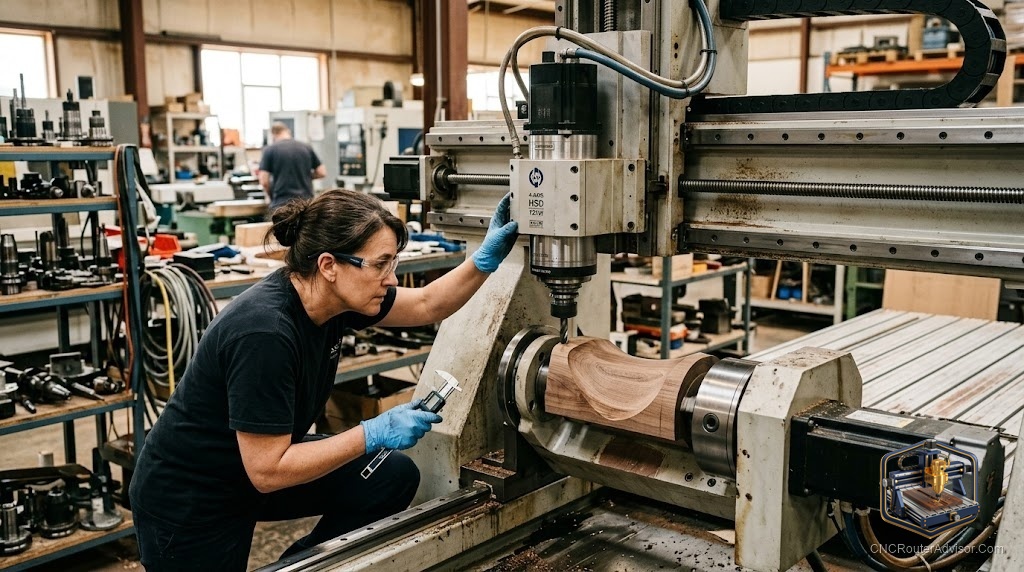
Shopping for a 4-axis CNC router is a different exercise from shopping for a standard 3-axis machine, because the fourth axis adds both capability and complexity, and both affect what you should look for and what you should pay. A 4-axis router can rotate the workpiece to carve cylindrical and multi-sided parts, table legs, balusters, columns, sculptural work, that a 3-axis machine cannot do without awkward re-fixturing. That capability is worth real money, but only if the fourth axis is well integrated and the machine is sound. This guide covers what a 4-axis router actually offers, the new-versus-used decision, and the specific things to check before you buy.
Buying any CNC router is about matching capability to your work and verifying condition and value. A 4-axis machine adds the question of whether you truly need the fourth axis and whether it is implemented well, which is where many buyers go wrong in both directions.
A 4-axis CNC router adds a rotary axis (usually the A axis) to the standard three, letting it rotate the workpiece so the tool can carve around cylindrical or multi-sided stock, table legs, balusters, columns, and sculptural pieces, that a 3-axis machine cannot do in one setup. When buying one, the new-versus-used decision hinges on budget, support, and risk: new machines offer warranty, support, and current integration; used machines offer savings but require careful inspection. Key things to check are the rotary axis integration (how well the A axis works with the control and software), overall mechanical condition (rails, bearings, drives, gantry), the spindle, the controller and software (which must properly support 4-axis work), and completeness. Above all, confirm you genuinely need the fourth axis, since it adds cost and complexity you should not pay for unless your work uses it.
Buy 4-axis only if your work needs rotary carving; then verify the rotary integration and the machine’s condition as carefully as any used-machine purchase.
What a 4-axis router adds
The fourth axis is a rotary axis that turns the workpiece (or in some designs indexes it), so the tool can approach around a cylinder or multiple faces. This enables:
- Cylindrical carving: table legs, balusters, columns, spindles, and posts carved all the way around.
- Multi-sided work: carving several faces of a part without manual re-fixturing between them.
- Sculptural and continuous 3D around a rotating blank.
Crucially, a 4-axis machine does everything a 3-axis does, plus rotary work. But the rotary capability only pays off if your projects actually use it. If you cut flat parts and reliefs, the fourth axis is cost and complexity you will not touch.
New versus used
Buying new gives warranty, manufacturer support, current control and software integration, and a known condition. For a machine as workflow-dependent as a 4-axis, that support and integration have real value, especially if you are newer to rotary work. The cost is a higher price.
Buying used saves money and can put a more capable machine within reach, but it carries risk: wear, outdated or poorly integrated controls, and missing components. The rotary axis in particular must be verified working and well integrated, since a poorly implemented or non-functional A axis undermines the whole reason to buy 4-axis. A used 4-axis is a good buy only when it is sound, complete, and the rotary axis genuinely works with the control and software.
For many buyers, the deciding factors are budget, appetite for risk, and how much they value support and current integration versus savings.
What to check before buying
Rotary axis integration. This is the distinguishing check. Confirm the A axis is present, functional, and properly integrated with the controller and CAM software, not a bolted-on afterthought. See it run rotary toolpaths if possible. Poor rotary integration is the single biggest 4-axis-specific risk.
Mechanical condition (especially used). Check linear rails and bearings for smooth motion and wear, the gantry and frame for squareness and impact damage, and the drive system (ball screws or rack) for wear and backlash. Feel for play by hand with power off.
The spindle. Check for runout and bearing noise, and ask about hours and cooling type. A worn spindle ruins finish and accuracy.
Controller and software. Confirm the controller and CAM software properly support 4-axis work, that licenses transfer (used), and that support is available. Obsolete or proprietary controls can be costly to replace.
Completeness. Controller, spindle and VFD, the rotary axis and its mounting, software and licenses, tooling, and documentation should all be present. Missing rotary components are especially costly.
See it run. New or used, insist on seeing the machine power up, home, and run, ideally a rotary job. A seller unable to demonstrate it is a warning sign.
Do you actually need the fourth axis?
This is the question to settle before any purchase. A 4-axis router costs more and is more complex to program and run. It is worth it if your work includes cylindrical or multi-sided parts, table legs, balusters, columns, sculptural pieces, that a 3-axis machine cannot do without impractical re-fixturing. If your work is flat parts, signs, and reliefs, a 3-axis machine is simpler, cheaper, and the better choice. Buying 4-axis capability you will not use is a common and expensive mistake.
The verdict
A 4-axis CNC router adds rotary carving of cylindrical and multi-sided parts to everything a 3-axis machine does, genuinely valuable if your work uses it and wasted cost if it does not. Settle that question first. If you do need it, weigh new (warranty, support, current integration) against used (savings, but risk), and check the machine carefully: above all the rotary axis integration, plus mechanical condition, spindle, controller and software support, and completeness. Insist on seeing it run. Bought for the right work and properly verified, a 4-axis router opens projects a 3-axis machine simply cannot reach.
Three things to take with you:
- The fourth (rotary) axis lets a router carve around cylindrical and multi-sided stock, table legs, balusters, columns, sculptural pieces, on top of all 3-axis work, but only pays off if your projects use it.
- New offers warranty, support, and current integration; used offers savings with risk. Either way, the rotary axis integration is the distinguishing thing to verify.
- Check the rotary integration, mechanical condition, spindle, controller and software support, and completeness, and insist on seeing the machine run before buying.
FAQ
What does the fourth axis on a CNC router do? It is a rotary axis (usually the A axis) that turns the workpiece so the tool can carve around cylindrical or multi-sided stock, table legs, balusters, columns, and sculptural pieces, that a 3-axis machine cannot do in one setup. A 4-axis machine also does everything a 3-axis does.
Should I buy a new or used 4-axis CNC router? New offers warranty, support, and current control and software integration, valuable for workflow-dependent rotary work. Used saves money but carries risk of wear, outdated controls, and missing components. Weigh budget, risk tolerance, and how much you value support against savings.
What is the most important thing to check on a 4-axis router? The rotary axis integration: confirm the A axis is present, functional, and properly integrated with the controller and CAM software, ideally by seeing it run rotary toolpaths. Poor rotary integration undermines the whole reason to buy 4-axis and is the biggest 4-axis-specific risk.
Do I really need a 4-axis CNC router? Only if your work includes cylindrical or multi-sided parts that a 3-axis machine cannot do without impractical re-fixturing. For flat parts, signs, and reliefs, a 3-axis machine is simpler, cheaper, and better. Buying unused 4-axis capability is a common, expensive mistake.
What should I check on a used 4-axis CNC router? The rotary axis integration and function, mechanical condition (rails, bearings, gantry squareness, drive wear and backlash), the spindle (runout, bearing noise, hours), controller and software 4-axis support and transferable licenses, and completeness including all rotary components. Insist on seeing it run.
Can a 4-axis router do everything a 3-axis can? Yes. A 4-axis machine performs all standard 3-axis operations, flat cutting, pocketing, engraving, and 3D relief, and adds rotary carving. The fourth axis is an addition, not a replacement, so you lose no 3-axis capability.
References
- CNCzone, 4-axis and rotary CNC router discussions: https://www.cnczone.com
- Wikipedia, CNC router axes and rotary configurations: https://en.wikipedia.org/wiki/CNC_router