
Genmitsu 3018-PRO CNC Router Review: The Honest Take on the Machine That Taught Thousands
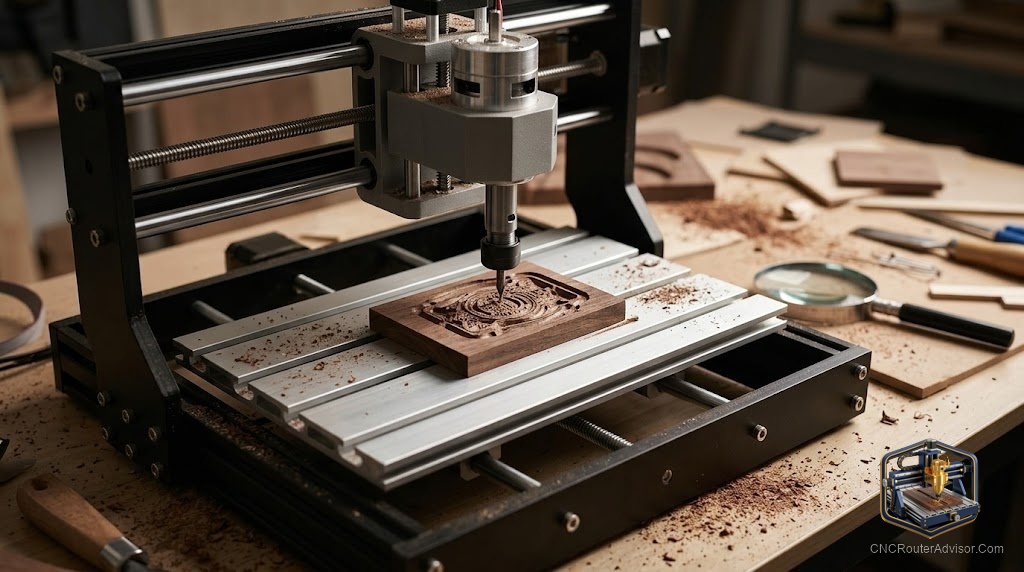
The 3018-PRO is the machine that introduced more people to CNC routing than probably any other single model. It appeared when desktop CNC was still a confusing category, it came in under a price that required serious financial commitment, and it ran on open-source firmware that a community could teach itself to use. For all of that, it earned its reputation.
It also earned a ceiling, and that ceiling is very real. The 3018-PRO is a learning tool and a light-engraving machine. It is not a production router. The people who understand that going in are happy with it. The people who do not discover the limits with a frustrating job rather than a framed education. This review names both clearly.
The Genmitsu 3018-PRO is a desktop CNC engraving machine made by Sainsmart under the Genmitsu brand. Its name describes its work area: 300 by 180 millimeters, or about 11.8 by 7.1 inches. The Z-axis travel is 45 millimeters. The frame is a mix of PF plastic and aluminum, with NEMA17 stepper motors, a lead screw drive on all axes, and a 60W spindle (maximum 120W) running on GRBL firmware via an 8-bit Atmega328p microcontroller. The machine ships as a kit that assembles in one to two hours.
For someone who wants to understand how CNC routing works by building and running a machine, the 3018-PRO is a legitimate starting point. For someone who wants to produce real output at any rate, the work area and spindle are both too small, and the frame is too flexible.
View the Genmitsu 3018-PRO on Amazon
What the 3018-PRO is actually good at
PCB milling is the application where the 3018-PRO performs at its genuine best. The machine’s small work area is adequate for most PCB layouts, its lead screw drive delivers better positioning precision than belt-drive alternatives in this size class, and the GRBL firmware integrates with the PCB milling workflow used by KiCad, Eagle, and FlatCAM. For electronics prototyping on a budget, the 3018 is a well-matched tool.
Soft material engraving is the other application where the machine earns its keep. MDF signs, name plates, small coasters, and engraved plaques in wood and acrylic at conservative feeds are all within the machine’s capability. Depth consistency is acceptable for most engraving work, and the GRBL/Candle workflow is approachable for a first-time CNC user.
Laser engraving is a bonus capability. The machine accepts a laser module in place of the spindle, which turns it into a functional laser engraver for wood, leather, and dark acrylic. The same work area applies, but for laser work 300 by 180 mm covers more ground than it does for router cutting.
The honest limitations
Work area. 300 by 180 mm is small. The space between your hands right now is probably bigger. This is an acceptable constraint for PCBs and small plaques. It is a permanent frustration for anyone trying to produce anything larger than a business-card-sized piece.
45mm Z clearance. Less than two inches between the spoilboard and the spindle nose. This limits workpiece height and makes material clamping an exercise in creative problem-solving.
60W spindle. Enough for soft wood and acrylic at light passes. Not enough for hardwood at any rate that matters. The spindle is also the noisiest part of the machine at high RPM, which is notable in a machine this small.
Plastic frame. The PF plastic components flex under cutting loads in a way that aluminum does not. For engraving, the flex is imperceptible. For any cutting that generates real lateral force, it shows up as chatter and lost accuracy. This is the trade that makes the machine affordable; understand it before you buy.
No limit switches on some versions. The base 3018-PRO variant lacks home switches. Without limit switches, homing is manual and repeatable workholding requires manual position setup each time. The SainSmart PRO version adds limit switches, an emergency stop, and a Z probe, and is worth the small price difference.
Setup and first use
Assembly is a real kit build, not a snap-together. Expect one to two hours. The assembly manual is adequate, and the community documentation fills the gaps. The machine ships with Candle as the recommended sender software, which handles job loading and jogging. For design and toolpath, Carbide Create, Easel, and Fusion 360 all work well with the GRBL firmware via a standard post-processor.
The first cut experience is accessible by desktop CNC standards. The machine is small enough to sit on a desk, the connections are few, and GRBL is well-documented. For a first-time user, the 3018-PRO’s learning curve is gentler than most alternatives.
Who should buy it and who should step up
For: A student, electronics hobbyist, or first-time CNC user who wants to understand the technology, do PCB work, or make small plaques and engravings. The combination of low cost, kit assembly, and open-source firmware makes it an ideal educational starting point.
Who should step up: Anyone whose projects require a work area larger than 11.8 by 7.1 inches, any hardwood cutting, or any production intent. The FoxAlien Masuter Pro, the Genmitsu PROVerXL 4030 V2, or any machine with an aluminum frame and a real spindle delivers the step-up capability this machine cannot provide.
The verdict
The 3018-PRO is an honest educational machine and a capable PCB milling and soft-material engraving tool within its work area. It is not a furniture router, a production sign machine, or a hardwood cutter. The people who are happy with it understood what they were buying. Buy it to learn, to mill PCBs, and to engrave small pieces. Buy something else for everything else.
Three things to take with you:
- PCB milling and soft-material engraving are the applications where the 3018-PRO genuinely performs; everything else runs into the frame and spindle ceiling quickly.
- The SainSmart PRO version with limit switches and Z probe is worth the marginal difference over the base model.
- When you have outgrown the 3018, the skill transfer to a larger machine is immediate; nothing learned here is wasted.
FAQ
What is the Genmitsu 3018-PRO’s work area? 300 by 180 millimeters (11.8 by 7.1 inches), with 45 millimeters of Z clearance. The name references the work area: 3018.
Can the Genmitsu 3018-PRO cut wood? Yes, soft woods, MDF, and plywood at conservative depths and feed rates. It is not suited to hardwood or any material requiring real cutting force at production speeds.
What software does the 3018-PRO use? GRBL firmware on an 8-bit Atmega328p controller. Candle (GRBL-Panel) is the recommended sender. Carbide Create, Easel, and Fusion 360 all work as CAM programs via standard GRBL post-processors.
Does the 3018-PRO work for PCB milling? Yes, this is one of its best applications. The lead screw drive provides adequate precision for PCB trace widths, and the work area fits most PCB layouts. It integrates well with FlatCAM for PCB milling workflow.
What is the difference between the 3018-PRO and the 3018-PRO with laser? The laser-equipped version includes a laser module that mounts where the spindle goes, turning the machine into a laser engraver. Both versions maintain the same mechanical platform; the laser is an add-on module, not a structural change.
What should I upgrade to after the 3018-PRO? For a larger work area and metal-frame rigidity: the FoxAlien Masuter Pro or a comparable all-aluminum entry machine. For a significant step up in rigidity and performance: the Genmitsu PROVerXL 4030 V2 with its ball screws and closed-loop motors.
References
- Sainsmart, 3018-PRO product page: https://www.sainsmart.com/products/sainsmart-genmitsu-cnc-router-3018-pro-diy-kit
- All3DP, Genmitsu CNC 3018-Pro review: https://all3dp.com/2/genmitsu-cnc-3018-pro-router-kit-buyer-s-guide/