
CNC Mill vs. Router: Key Differences and Which to Choose
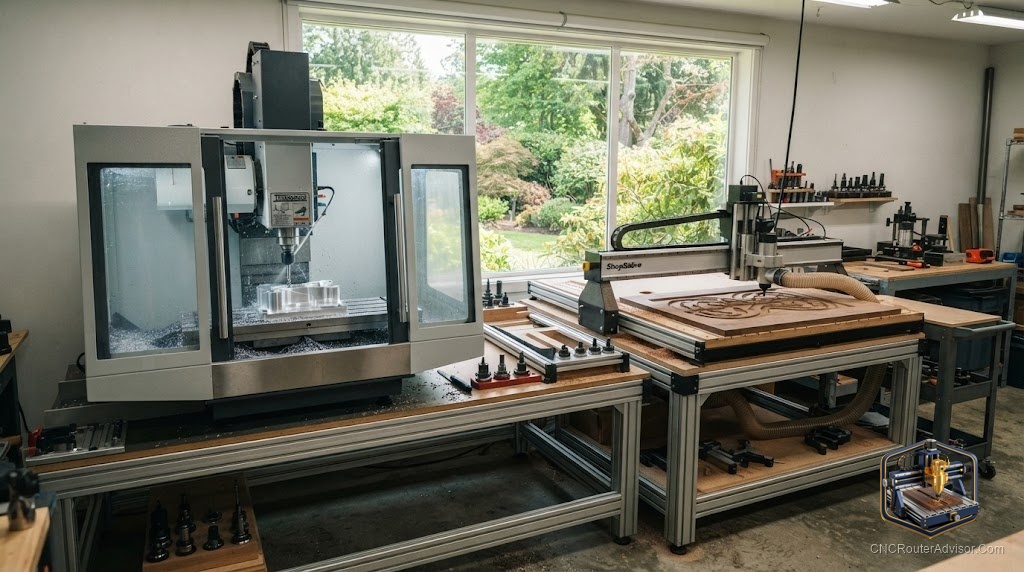
One of the most common questions new buyers ask sounds simple but hides a lot: should I get a CNC mill or a CNC router? The two machines look similar, both move a spinning cutter under computer control, and their names get used interchangeably online. But they are built for different jobs, and buying the wrong one for your work leads to either wasted money or constant frustration. The difference comes down to what you cut and how.
A CNC mill and a CNC router are both computer-controlled cutting machines, but a mill is built heavy and rigid to cut metal with high precision over a smaller area, while a router is built lighter and faster to cover large areas in softer materials like wood, plastic, and aluminum. Choosing between them is really about matching the machine to your materials, part sizes, and precision needs.
Short answer: choose a CNC router if you mainly cut wood, plastic, and light aluminum, especially large panels and signs, and value speed and work area. Choose a CNC mill if you cut steel and hard metals or need tight tolerances on smaller precision parts. Many hobbyists start with a router because its materials and project sizes match woodworking and light fabrication.
The core difference
Everything follows from how each machine is built.
- A CNC mill is heavy, rigid, and powerful, designed to remove metal with high accuracy. It typically has a smaller work envelope, a stout spindle geared for torque, and the mass to resist the big forces of cutting steel. Precision and rigidity come first; speed and size come second.
- A CNC router is lighter and faster, designed to move quickly across a large table in softer materials. It has a big work area, a high-RPM spindle or trim router, and a lighter frame. Speed and reach come first; it handles wood, plastic, and light aluminum rather than steel.
Think of it as reach versus muscle. The router reaches across a full sheet of plywood; the mill has the muscle and rigidity for a small steel part.
How they compare
| Factor | CNC Router | CNC Mill |
|---|---|---|
| Best materials | Wood, plastic, light aluminum | Steel, hard metals, aluminum |
| Work area | Large (sheets, panels) | Smaller, precision envelope |
| Rigidity | Lighter frame | Heavy, very rigid |
| Speed | Fast traverse over big areas | Slower, force-focused |
| Spindle | High RPM | High torque |
| Typical use | Signs, furniture, panels, carving | Precision metal parts, molds |
| Precision | Good for its materials | Very high tolerance |
Which should you choose
Ask three questions:
- What material? Wood, plastic, and light aluminum point to a router. Steel and hard metals point to a mill.
- What size parts? Large panels and signs favor a router’s big table. Small, precise parts favor a mill’s rigid envelope.
- What tolerance? General woodworking and light fabrication are fine on a router. Tight-tolerance metal parts need a mill.
For most woodworkers, sign makers, and hobbyists cutting softer materials, a router is the right and more affordable choice. For machinists cutting steel to tight tolerances, a mill is worth its cost and complexity.
Popular beginner routers
If your answers point to a router, several machines have strong beginner reputations across budgets and sizes: the Genmitsu 3018 PROVer for small desktop learning, the Sienci LongMill MK2 and BobsCNC Evo 4 for affordable larger work, the Shapeoko 5 Pro and X-Carve for well-supported mid-range cutting, the Onefinity Woodworker for rigid ball-screw performance, and the Carbide Nomad 3 for enclosed precision on small parts. Each pairs a different budget and work area with the community support beginners need.
Product picks
Genmitsu 3018 PROVer V2 (learn the basics cheaply). A small, affordable desktop router ideal for learning CNC fundamentals in wood, plastic, and PCBs before committing to a larger machine. Honest flaw: the tiny work area and light frame limit it to small, light jobs, so you will outgrow it if your ambitions are large. On Amazon.
SainSmart Genmitsu PROVerXL 4030 V2 (room to grow). A rigid desktop router with a generous bed for signs, furniture parts, and light aluminum, a strong step up for someone who knows a router fits their work. Honest flaw: it ships with a trim router rather than a quiet spindle, so long sessions are loud. On Amazon.
The bottom line
The mill-versus-router choice is not about which is better, but which fits your work. Routers win on work area and speed in wood, plastic, and light aluminum; mills win on rigidity and precision in steel and hard metals. Answer the material, size, and tolerance questions honestly and the right machine is obvious. Most woodworkers and hobbyists are best served by a router, while machinists cutting metal to tight tolerances need a mill.
FAQ
What is the main difference between a CNC mill and router? A mill is heavy and rigid for precise metal cutting over a smaller area; a router is lighter and faster for large areas in wood, plastic, and light aluminum.
Can a CNC router cut metal? Yes, light aluminum and soft metals with the right setup, but not steel and hard metals the way a mill can.
Which is better for woodworking? A router, by a wide margin. Its large work area, speed, and high-RPM spindle suit wood, signs, and furniture parts.
Which is more precise? A mill holds tighter tolerances, especially in metal. A router is plenty precise for woodworking and light fabrication.
Which should a beginner buy? Most beginners want a router, since its materials and project sizes match woodworking and light fabrication and it costs less.
Why do people confuse the two? Both move a spinning cutter under computer control and the terms get used loosely online, but their construction and intended materials differ.
Can one machine do both jobs? Not really. A router struggles with steel and tight tolerances, while a mill’s small, slow envelope is impractical for large panels.
References
- CNCRouterInfo, best CNC router for beginners: https://cncrouterinfo.com/routers/best-cnc-router-for-beginners/
- WorkshopCalc, best CNC routers guide: https://workshopcalc.com/guides/best-cnc-routers