
CNC Router vs Mill: The Real Differences and Which to Choose
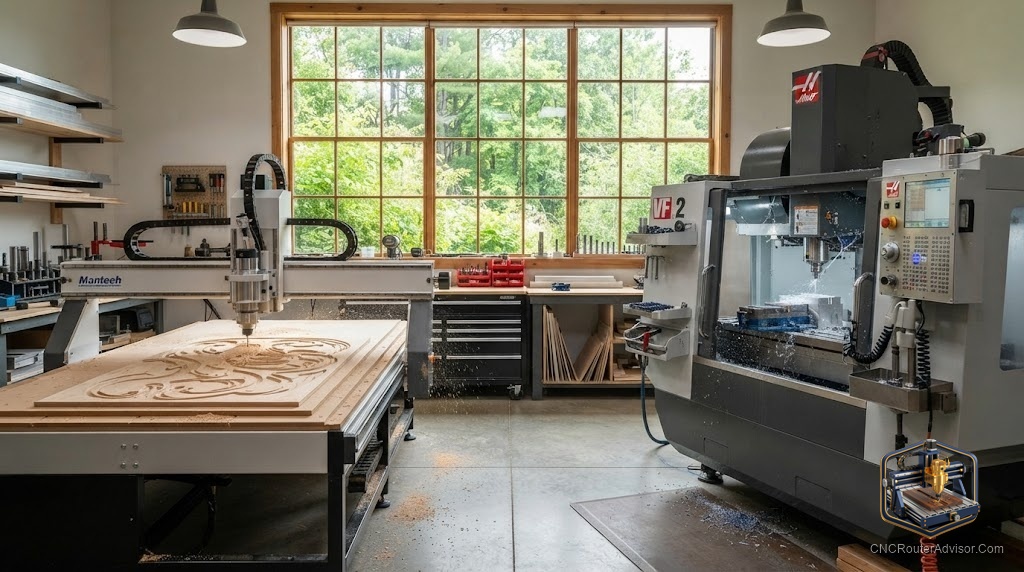
This is one of the most common crossroads in the hobby, and it is also one of the most misunderstood. People treat “router” and “mill” as fancy words for the same machine, then wonder why their router struggles with steel or their mill feels clumsy cutting a large sign. They are different tools built around different priorities, and choosing the wrong one means fighting your machine on every project.
I have owned and used both, and the decision is simpler than the debate makes it sound. Once you understand what each machine is optimized for, your own answer becomes obvious.
What each machine is
A CNC router and a CNC mill both use Computer Numerical Control to move a cutting tool across the X, Y, and Z axes. The difference is what they are built to cut and how they are built to cut it.
A CNC router spins its cutter very fast and moves quickly across large, relatively flat material. It is optimized for wood, plywood, MDF, plastics, foam, and soft metals like aluminum. Its strength is speed and reach across a big work area. A CNC mill spins slower with far more torque, sits on a heavy rigid frame, and is built to remove metal precisely. Its strength is power and rigidity in a smaller, deeper work envelope. In short, a router covers ground fast, and a mill removes metal hard.
The short answer
Choose a CNC router if you mainly cut wood, sheet goods, plastics, and the occasional aluminum part, and you value a large work area. Choose a CNC mill if you mainly cut metal, need tight tolerances in steel and thick aluminum, and can accept a smaller work area. For the vast majority of hobbyists, woodworkers, and sign makers, the router is the correct tool.
Most people reading this want a router, and the good news is that a rigid router even handles light aluminum. A metal-capable desktop router such as the Genmitsu 3030-PROVer Ultra bridges the gap for people who cut mostly wood but want occasional metal ability: Check on Amazon . If your work is truly metal-first, a mill is the honest recommendation instead.
Speed versus torque
The clearest difference is at the spindle. A router spins fast, which suits materials that cut cleanly at high speed like wood and plastic. That same high speed and lower torque is why routers struggle with hard metal, where you need the tool to bite slowly and forcefully.
A mill flips this. It spins slower but delivers far more torque, letting it push a cutter through steel without stalling. Try to cut steel on a router and the tool rubs, heats, and fails. Try to cut a four-foot sign on a small mill and you run out of work area immediately. Each machine is fast or forceful, and that single trait shapes everything else about it.
Rigidity and frame
Mills are heavy on purpose. Cutting metal generates large forces, and only a massive rigid frame keeps the cut accurate. That mass is why a mill holds tight tolerances in steel and why it costs and weighs so much for a modest work area.
Routers trade some of that rigidity for size and speed. A good router frame is stiff enough for wood and light aluminum across a large span, but it cannot match a mill for cutting hard metal precisely. This is the core tradeoff. You can have a large, fast, lighter machine for soft materials, or a small, slow, heavy machine for hard ones, but not both in one affordable tool.
Work area and materials
| Factor | CNC router | CNC mill |
| Best materials | Wood, MDF, plastic, aluminum | Steel, thick aluminum, hard metals |
| Spindle | Fast, lower torque | Slower, high torque |
| Work area | Large and flat | Small and deep |
| Frame | Lighter, wide span | Heavy, very rigid |
| Typical use | Signs, furniture, carving | Precision metal parts |
Cost and footprint
For a given price, a router gives you far more work area, and for a given work area, a mill costs and weighs far more. A router also fits more easily into a home shop and is quieter to live with, though it produces more dust. A mill demands a solid bench or floor, produces metal chips and often coolant mess, and rewards you with metal precision a router cannot touch. Match the machine to your space as honestly as you match it to your material.
Who should choose which
Skip the router if your work is genuinely metal-first, you need tight tolerances in steel, or you machine parts rather than carve them. A router will only frustrate you there. Skip the mill if you cut wood, signs, furniture, and sheet goods, or if you need a large work area, because a mill’s small heavy envelope is the wrong shape for that work. And if you cut mostly wood with occasional aluminum, a rigid router is the practical single-machine answer.
The verdict
CNC router versus mill is not a question of which is better, but which is built for your material. Routers are fast, large, and ideal for wood, plastic, and light metal. Mills are heavy, precise, and built for hard metal in a smaller space. Most hobbyists, woodworkers, and makers want a router, and a rigid metal-capable router even covers occasional aluminum. Reserve the mill for genuine metal machining where its torque and rigidity are worth the smaller work area and higher cost.
Pick the tool that matches what you cut most, and it will feel like an extension of your hands instead of an obstacle.
Frequently asked questions
Can a CNC router replace a mill? For wood, plastic, and light aluminum, yes. For steel and precise heavy metal work, no. A router lacks the torque and rigidity a mill provides for hard metal.
Can a CNC router cut metal at all? A rigid router cuts soft metals like aluminum with the right tooling and technique. It cannot handle steel or heavy metal removal the way a mill does.
Why is a mill so much heavier than a router? Cutting metal creates large forces, and mass keeps the cut accurate. A mill’s heavy rigid frame is what lets it hold tight tolerances in steel.
Which is better for a beginner? Most beginners cut wood, signs, and plastic, so a router is the better and more versatile first machine. Choose a mill only if your goal is metal machining.
Which has a larger work area? Routers do. For the same money, a router offers far more work area, which is why they suit large flat projects like signs and furniture.
Do I need both machines? Most hobbyists do not. A rigid router handles wood, plastic, and light aluminum. Add a mill only when serious metal work becomes a regular need.
References
- CNCRouterInfo, best CNC router for beginners: https://cncrouterinfo.com/routers/best-cnc-router-for-beginners/
- WorkshopCalc, best CNC routers guide: https://workshopcalc.com/guides/best-cnc-routers