
Wood CNC Router Guide: Machines, Bits, Software, and Projects
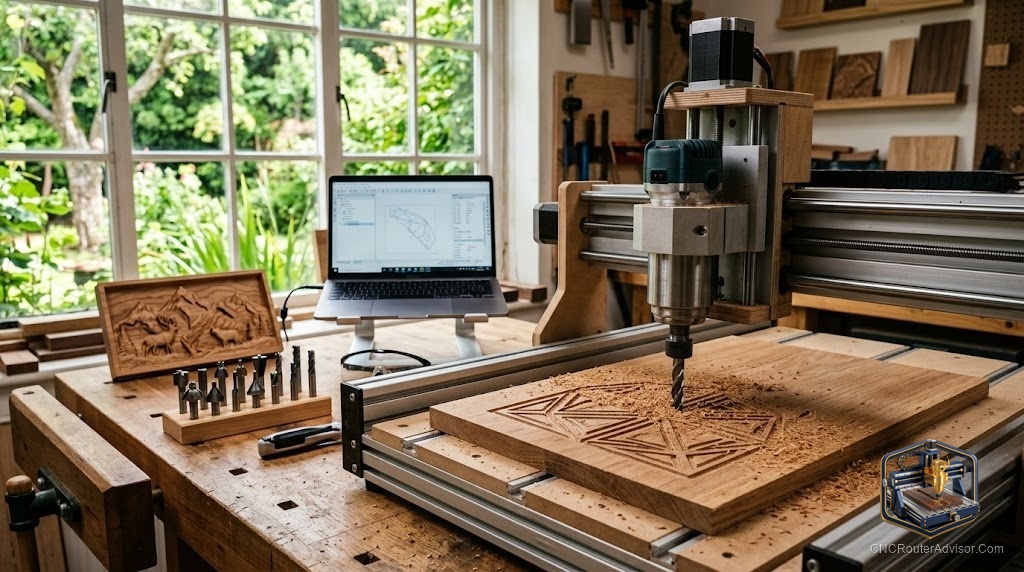
You clamp a sheet of birch plywood to the bed, press go, and step away to refill your coffee. By the time you are back, the machine has carved twelve identical drawer fronts, each edge clean enough to skip most of the sanding. That is the moment most woodworkers get hooked. If you have typed “router wood cnc” into a search bar and ended up buried in spec sheets, this guide pulls the whole picture together: what these machines do, what they cut, which bits and software you need, and what to make first.
A wood CNC router is a computer-controlled cutting machine. It moves a spinning bit across three axes to carve, pocket, engrave, and cut shapes from a digital file. Think of a handheld router that drives itself along an exact path, over and over, with no hand tremor and no guesswork.
What a wood CNC router does, in plain terms
Here is the short answer to the question most beginners ask: a cnc wood router turns a design on your screen into a finished wood part by following a set of coordinates called toolpaths. You draw or import a shape, tell the software how deep and how fast to cut, and the machine handles the rest.
The workflow has four steps. You design in CAD software, generate toolpaths in CAM software, send that file (G-code) to the machine’s controller, and then cut. Repeat that loop and you can produce signs, inlays, cabinet parts, and 3D reliefs that would take hours by hand.
The appeal is repeatability. A cnc wood router machine cuts part number fifty exactly like part number one. That consistency is why small shops use these tools to sell signs, coasters, and furniture components without hiring extra hands.
Which materials a wood CNC router cuts
Wood is the home turf, but a good cnc router machine for wood handles far more.
Start with the woods. Softwoods like pine, cedar, and poplar cut fast and are easy on your bits, which makes them ideal for learning and for painted signs. The trade-off is fuzz: soft, fibrous grain can leave whiskery edges, so a light finishing pass helps. Hardwoods like oak, maple, and walnut give you crisp detail and a premium finish, but they burn more easily, so you slow down and take shallower bites.
Sheet goods are where a wood cnc router earns its keep. Plywood and MDF cut cleanly and predictably, which is why cabinet and furniture shops lean on them. Baltic birch plywood in particular cuts beautifully and holds fine detail.
Beyond wood, these machines cut plenty of plastics and composites:
- Acrylic, for signs, edge-lit displays, and jigs. Cast acrylic machines cleaner than extruded.
- HDPE, Delrin (acetal), and ABS, for functional parts, fixtures, and gears.
- Rigid foam, for molds, patterns, and prototypes.
- Carbon fiber and fiberglass, which cut but demand serious dust control (more on that below).
The key with plastics is heat. Cut too slowly and the material melts and welds back together behind the bit. You want to make chips, not dust, which keeps heat in the chip and away from the part. For HDPE, a single-flute bit at roughly 18,000 RPM with a healthy feed rate is a common starting point.
Machine sizes: from desktop to full sheet
The size question comes down to one thing: how big is the biggest part you want to make? Buy the work area your projects need, plus a little room to grow.
| Machine class | Rough work area | Best for | Watch out for |
|---|---|---|---|
| Compact desktop | About 12 by 12 in | Coasters, jewelry, small inlays, learning | Too small for furniture parts |
| Mid desktop | About 24 by 24 in | Signs, drawer fronts, small cabinet doors | Cannot cut full sheets |
| Benchtop pro | About 32 by 32 in | Batch small parts, plaques, tray work | Needs a dedicated bench |
| Full sheet (1325) | About 4 by 8 ft | Cabinet doors, nested panels, tabletops | Needs floor space and stronger dust collection |
That last row is worth a note. Full-sheet machines are often labeled “1325” because the bed measures roughly 1300 by 2500 millimeters, which is close to a 4 by 8 foot sheet. An 8’x4’ 1325 woodworking cnc router from a maker like IEHK is aimed at production shops that process whole sheets of plywood or MDF in one setup. For a home garage, a 24 by 24 machine covers most of what hobbyists actually build, and you can flip or reposition longer stock using a technique called tiling.
Desktop families like Shapeoko and Onefinity are common first machines because they balance a usable cnc wood router table footprint with real cutting ability. If you plan to move into furniture or slab flattening, size up early. It is easier to grow into a bigger bed than to outgrow a small one.
Router bits: the single most underrated choice
Beginners obsess over the machine and ignore the bit. That is backwards. The bit shapes your finish, your speed, and how often you snap tooling.
For most wood cutting you will reach for spiral end mills, and the direction of the spiral matters:
- Up-cut bits pull chips up and out of the cut. That excellent chip evacuation keeps the bit cool and is great for deep pockets, but it can lift and tear the top surface, especially on veneered plywood.
- Down-cut bits push chips down, leaving a clean top edge. The catch: chips pack into the cut, which traps heat, so they are poor for deep pockets.
- Compression bits combine both. The up-cut section clears the bottom and the down-cut section presses the top, giving clean faces on both sides of plywood and laminate. The trick is that your first pass must go deep enough to engage the down-cut portion, or you just get up-cut results.
A single-flute end mill deserves special mention. With one cutting edge, it leaves a huge gap for chips to escape, so it excels at plastics and soft materials where heat and melting are the enemy. Many plastic and aluminum problems disappear the moment you switch to a single-flute O-flute bit.
Buy solid carbide over high-speed steel. Carbide holds its edge far longer, and a dull bit burns wood, melts plastic, and loads up your machine.
Software: CAD and CAM
Every cnc wood routing project passes through two kinds of software. CAD is where you design the shape. CAM is where you turn that shape into toolpaths the machine can run. Some programs do both.
Three names come up constantly, and they serve different woodworkers:
- Carbide Create is the easy on-ramp. It is approachable and gets you cutting 2D and 2.5D projects fast, which builds confidence. It runs on Mac or Windows.
- Vectric VCarve is the woodworker’s favorite. Sign makers and furniture builders love its text tools, V-carving, inlays, and clean toolpath previews. It tends to earn the highest satisfaction scores among woodworking hobbyists.
- Fusion 360 is the powerhouse. Its learning curve is steep, but it dominates among people who also cut aluminum and need full 3D modeling.
If your goal is signs, plaques, and decor, VCarve is the sweet spot. If you are on a tight learning timeline, start with the free software that shipped with your machine and upgrade once you hit its limits. If you already cut metal or design mechanical parts, Fusion 360 pays off.
Dust collection is not optional
Here is the part new owners skip and later regret. Wood dust is a genuine health hazard. OSHA notes that breathing airborne wood particles from cutting and sanding can cause allergic and non-allergic respiratory symptoms and has been linked to cancer of the nasal cavity. OSHA sets a permissible exposure limit of 15 mg/m3 for total wood dust and 5 mg/m3 for the respirable fraction.
The fix is a dust boot around the bit connected to a shop vacuum or dust collector. OSHA’s preferred approach is exhaust ventilation that captures dust right where it is made, with a respirator as backup when ventilation is not enough.
Composites raise the stakes. Carbon fiber and fiberglass dust are abrasive and irritating, and research on machining carbon fiber reinforced parts found that the fine particles smaller than 10 microns are the ones most dangerous to the operator. If you cut those materials, run strong extraction and wear a proper P100 respirator, not a paper dust mask.
Desktop versus full-sheet: which should you buy?
Put the two ends of the market head to head and the decision gets clear.
A mid-size desktop machine wins for most people. It fits on a bench, sips less shop space, learns faster, and handles signs, small cabinet doors, and nested small parts. Its limit is raw size and, on cheaper models, a flexible frame that forces slower feeds.
A full-sheet 1325 machine wins only when your product demands it. If you process whole sheets daily and sell the output, the larger bed and stiffer frame pay for themselves in saved setups. For a weekend maker, it is more machine, more dust, and more floor than the work requires.
The honest middle path: buy the most rigid machine in the largest size your space and work truly need, then spend real attention on bits, dust collection, and software. Those three decide your results more than the logo on the gantry.
Verdict and takeaways
A wood CNC router rewards patience more than it rewards spending. The machine is only one leg of the stool. Nail the material choice, the bit, and the workflow, and even a modest desktop machine produces work you can sell.
- For a first machine, a 24 by 24 desktop router covers signs, small furniture parts, and learning without eating your shop.
- Match the bit to the job: up-cut for deep pockets, down-cut for clean tops, compression for plywood, single-flute for plastics.
- Learn VCarve if you focus on woodworking; reach for Fusion 360 if you also cut metal.
- Set up dust collection on day one, and treat carbon fiber and fiberglass as respirator-required jobs.
FAQ
Is a CNC router the same as a handheld router? No. A handheld router is guided by your hands. A CNC router moves a similar spinning bit automatically along a computer-controlled path, cutting the same shape exactly every time.
What is the best wood to start with? Poplar and Baltic birch plywood. Both cut cleanly, forgive beginner mistakes, and are easy on your bits, so you can focus on learning feeds, speeds, and workholding.
Can a wood CNC router cut metal? It can cut soft, non-ferrous metals like aluminum with the right bit, feeds, and a rigid machine. Steel is generally out of reach for router-style machines. Most owners stick to wood, plastics, and the occasional aluminum part.
Why is my machine making dust instead of chips? Your feed rate is too low for your spindle speed. When the bit spins fast but moves slowly, it rubs and grinds rather than slicing, which creates heat, dust, burning in wood, and melting in plastic. Speed up the feed or slow the RPM.
What software should a complete beginner use? Start with the free program that came with your machine or with Carbide Create. Once you understand toolpaths, move to Vectric VCarve for woodworking or Fusion 360 for 3D and metal work.
How do I stop tear-out on plywood? Use a down-cut or compression bit, take shallower passes, and add a light finishing pass. An up-cut bit lifts the top veneer, which is the usual cause of a fuzzy or chipped top edge.
Do I really need dust collection? Yes. Wood dust is a recognized respiratory hazard with an OSHA exposure limit, so a dust boot plus a vacuum or collector protects both your lungs and your machine’s moving parts.
What projects sell well from a wood CNC router? Custom signs, cutting and charcuterie boards, inlays, jigs, and cabinet parts. Small, personalized decor tends to move fastest for hobby shops testing the market.
References
- Occupational Safety and Health Administration, Wood Dust Overview
- Occupational Safety and Health Administration, Wood Dust Chemical Data (exposure limits)
- Occupational Safety and Health Administration, Personal Protective Equipment
- Effect of Cutting Conditions on Dust Particle Size During Milling of Carbon Fibre-Reinforced Composites, PMC
- Interstate Plastics, How to Cut and Machine HDPE