
Inexpensive CNC Wood Router Guide: Tooling, Speeds, Workholding, and Finish Quality
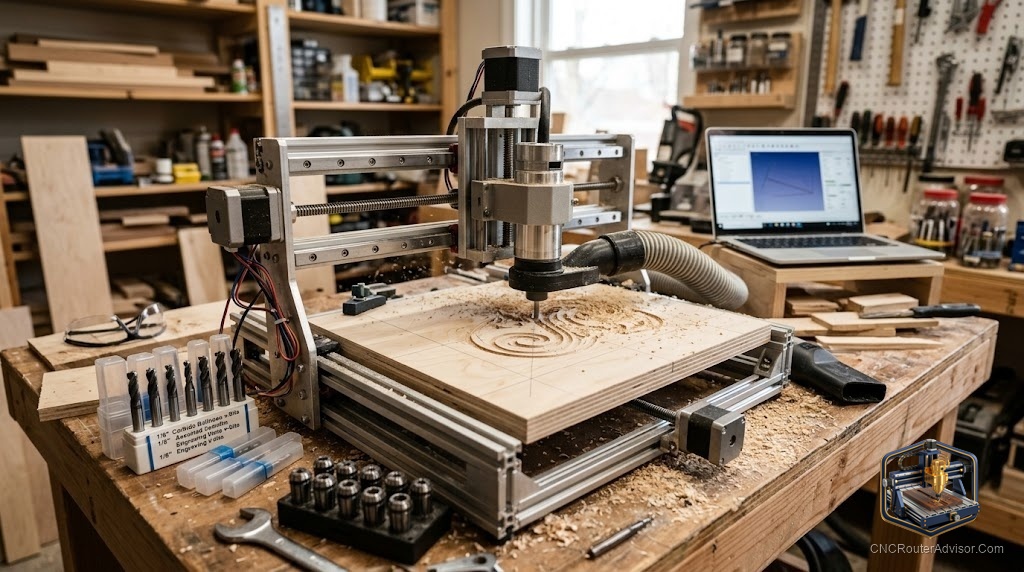
There is a real fear behind every budget CNC search: that cheap means junk, that you will spend your money and end up with a flexy, frustrating machine that cuts wavy lines and breaks bits. The good news is that affordable CNC routers have gotten genuinely good, and plenty of people cut clean, sellable work on inexpensive machines every day. The trick is knowing what corners a low price actually cuts, choosing a machine that cut the right ones, and setting it up so it performs well above its price.
An inexpensive CNC wood router is an affordable, usually compact machine for cutting and carving wood, plastics, and light materials, aimed at beginners and budget-conscious makers. Keeping the price low means trade-offs, often lighter frames, trim routers instead of spindles, and simpler drives, but a well-chosen budget machine still cuts clean work within its limits. Knowing where affordable machines cut corners, and how to work around those limits with good tooling, speeds, and workholding, is what gets great results on a small budget.
Short answer: an inexpensive CNC wood router trades rigidity, spindle quality, and drive precision for a low price, but a well-chosen one still cuts clean signs, small parts, and carvings within its limits. Look for the best rigidity and a proven, well-supported model in your budget, then get results with sharp carbide bits, conservative feeds and speeds, shallow passes, and firm workholding. Match your projects to the machine’s honest capability.
Where affordable machines cut corners
Understanding the trade-offs helps you buy smart and set expectations:
- Frame rigidity. Budget machines often use lighter frames, which flex more, so cut shallower and slower.
- Spindle. Most use a mounted trim router rather than a quiet, powerful VFD spindle, meaning more noise and less sustained power.
- Drive system. Belts or basic lead screws instead of ball screws, trading some precision.
- Work area. Usually compact, which fits small projects but not full sheets.
- Support. Varies widely, so a proven model with a strong community is worth prioritizing.
None of these make a budget machine useless; they simply define its limits.
Choosing a good inexpensive machine
Within a budget, prioritize:
- The best rigidity you can get, since it most affects cut quality.
- A proven, well-supported model, so problems have known solutions.
- A work area that fits your realistic projects.
- Upgrade potential, like the option to add a spindle later.
A slightly less feature-packed machine with strong community support often beats a cheaper unknown with none.
Getting great results within the limits
A budget machine rewards good technique:
- Sharp carbide bits, which cut cleaner and reduce the force a light machine struggles with.
- Conservative feeds and speeds, matched to a proper chip load so the bit shears rather than rubs.
- Shallow passes, building depth gradually to avoid flexing a lighter frame.
- Firm workholding, since a budget machine has no margin for a shifting workpiece.
- Patience, letting the machine cut at a pace it can handle cleanly.
Work within the machine’s honest capability and the results can look far above the price.
Workholding and dust
Hold work firmly with clamps or a clamping kit over a flat spoilboard, since a light machine cannot fight a moving workpiece. Manage dust with a shop vacuum or dust shoe, both for health and for clear cuts. These basics matter even more on budget machines, where any extra problem shows up in the finish.
Product picks
SainSmart Genmitsu 3018-PROVer V2 (affordable starter). A popular, well-supported compact machine that cuts small signs, plaques, and light parts cleanly for its price, with a large community behind it. Honest flaw: the small work area and light build limit project size and cutting force, so you may outgrow it. On Amazon.
FoxAlien XE-PRO (stouter budget option). A more rigid affordable machine that handles wood well and even light aluminum with care, a step up in capability while staying budget-minded. Honest flaw: it is still a light machine, so passes must stay shallow and feeds patient. On Amazon.
VEVOR 300W CNC router (very low-cost entry). An inexpensive way to try CNC and cut small wood and plastic projects, fine for learning the basics. Honest flaw: build quality and support are more variable than pricier machines, so expect to tinker and keep passes light. On Amazon.
Who should skip a budget machine
Skip an inexpensive machine if you need to cut full sheets, run production volumes, or machine metal seriously, since a light budget router cannot do those cleanly. Skip the very cheapest unknown models if you want reliable support and minimal tinkering; a slightly pricier proven machine saves frustration. But for learning, hobby projects, and small sellable work, a well-chosen budget machine is a genuinely smart start.
The bottom line
An inexpensive CNC wood router is not a compromise you have to regret. Affordable machines cut real corners, lighter frames, trim routers, simpler drives, but a well-chosen one cuts clean signs, parts, and carvings within its limits. Prioritize rigidity and proven support in your budget, then lean on sharp carbide, conservative speeds, shallow passes, and firm workholding. Match your projects to the machine’s honest capability, and a small budget can still produce work you are proud of.
FAQ
Are cheap CNC routers any good? Well-chosen ones are. Affordable machines trade rigidity, spindle quality, and drive precision for price, but cut clean signs, small parts, and carvings within their limits.
What do budget CNC routers give up? Usually frame rigidity, a real spindle (using a trim router instead), drive precision, and work area, plus more variable support on the cheapest models.
How do I get good cuts on a cheap machine? Use sharp carbide bits, conservative feeds and speeds, shallow passes, and firm workholding, and be patient, letting the machine cut at a pace it handles cleanly.
What can I make with an inexpensive CNC router? Signs, plaques, small parts, boxes, inlays, and light carving in wood and plastics, with size limited by the machine’s compact work area.
Can a budget machine cut metal? Some handle light aluminum with careful technique, but serious metal work needs a rigid machine. Treat metal on a budget router as occasional and light.
Which inexpensive machine should a beginner get? A proven, well-supported model with the best rigidity in your budget, like a popular compact machine with a large community, over a cheaper unknown.
Will I outgrow a budget CNC router? Possibly, if you move to larger projects, production, or metal. Look for a machine with upgrade potential, like the option to add a spindle later.
References
- CNCRouterInfo, how to choose a CNC router: https://cncrouterinfo.com/guides/how-to-choose-a-cnc-router/
- BubbleRelief, CNC router projects for beginners: https://bubblerelief.com/cnc-router-projects-for-beginners/